Provides mes capabilities through a typed MCP contract.
← MCP server registry
Business operationsPublic source
MES MCP Server
A Manufacturing Execution System for ADK-Rust Enterprise electronics, food & beverage, and manufacturing agents. 24 MCP tools spanning work orders & routing, scheduling, shop-floor execution, OEE, factory test yield,…
What it gives an agent
A purpose-built capability behind one MCP connection.
The server owns its domain logic and publishes a tool contract an MCP client can discover. ADK-Rust can load that contract into an agent, normalize each schema for the chosen model provider, and keep the connection lifecycle outside the agent’s business logic.
Architecture
How MES MCP Server fits into an agent system.
The model never needs the implementation details or credentials of the system behind the server. It sees reviewed tool definitions. The MCP client handles discovery and calls, while the server keeps ownership of validation, policy, and communication with its domain system.
01
ADK-Rust agent
Chooses a capability from the reviewed tool catalog.
02
MCP client
Discovers schemas, sends calls, and receives typed content.
03
MES MCP Server
Validates the request and owns 24 documented tool contracts.
04
Domain system
Keeps the API, data, credentials, and business rules behind the server.
From the project documentation
The server’s published architecture
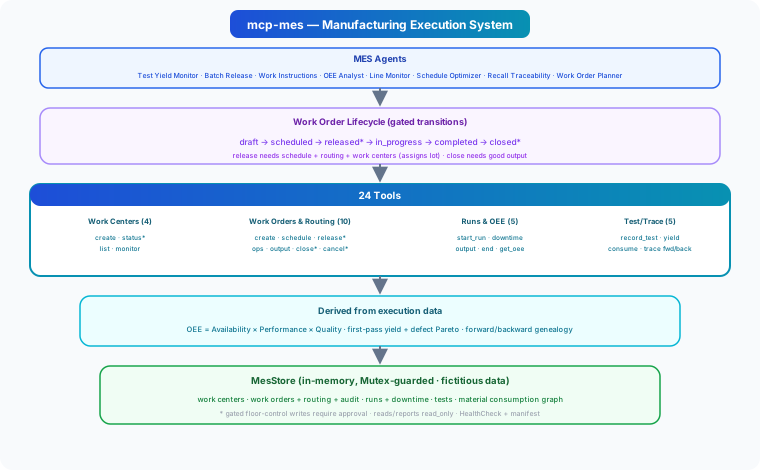
Tool catalog
What can an agent ask MES MCP Server to do?
Each tool has a stable name, a human-readable purpose, and a JSON input contract discovered during MCP initialization. Risk classes come from the project’s registry manifest when one is available.
24 named tools
create_work_centerRegister a work center / line station with an ideal cycle time
internal writeget_work_centerGet a work center
read onlylist_work_centersList work centers (optionally by line)
read onlyset_work_center_statusSet a work center status (running/idle/setup/down/maintenance)
internal writecreate_work_orderCreate a work order with a routing of operations
internal writeget_work_orderGet a work order with routing, output, and audit trail
read onlysearch_work_ordersSearch work orders by domain/status/line
read onlyschedule_work_orderSchedule a work order to a line and time window
internal writerelease_work_orderRelease a scheduled work order to the floor (gated on routing/work centers)
internal writestart_operationStart a routing operation by sequence
internal writecomplete_operationComplete a routing operation
internal writerecord_outputRecord good/scrap output against a work order
internal writeGovernance
Understand the effect of every tool.
A server connection inherits the authority of its credentials and deployment environment. The declarations below come from this project’s README and MCP registry manifest; your application still decides which tools an agent receives and where approval is required.
16 internal write8 read only
- Gated floor-control writes — work order release/close/cancel and work center status changes require approval in production; reports and traces are read_only.
- Interlocked lifecycle — release and close rules prevent invalid state transitions.
- Work order audit trail — every state change is recorded.
- Integration scaffold — the in-memory store is for development; back it with your real MES of record and bind actors to authenticated identities in production.
MCP surface
What the current documentation declares.
MCP can carry tools, resources, prompts, structured results, progress, cancellation, and long-running work. This record highlights the modern protocol features explicitly mentioned by this repository.
The current README concentrates on its tool surface. Check the source and release notes before relying on optional MCP capabilities beyond tool discovery and invocation.
ADK MCP SDKrmcpRegistry manifest
Install and connect
Follow the project’s documented starting point.
Install the server in the environment that owns its credentials and domain access. Add it to your MCP host, verify the discovered tools, and narrow the toolset before giving it to a production agent.
Install
cargo install mcp-mesADK-Rust connection shape
let toolset = McpToolset::from_stdio(
    "mcp-mes",
    ["mcp-mes"],
).await?;

let agent = LlmAgentBuilder::new("agent")
    .tools(toolset.tools().await?)
    .build()?;
Commands and configuration are extracted from the public README. Confirm prerequisites, environment variables, and release-specific options in the official documentation before deployment.
Official documentation
Continue with the project maintainers’ source of truth.
This page provides an approachable map of the server. The repository remains authoritative for exact schemas, prerequisites, configuration, examples, tests, releases, and security updates.
Keep exploring
More in business operations.
Ads MCP ServerA digital advertising platform for ADK-Rust Enterprise sales & marketing agents. 19 MCP tools covering campaigns, ad groups, ads/creatives, budgets and bids, audiences, daily performance metrics with derived KPIs…19 toolsAnalytics MCP ServerGoverned analytics platform for AI agents — metrics, dashboards, funnels, cohorts, anomaly detection, forecasting, and policy enforcement. 28 tools with full audit trail.28 toolsBanking MCP ServerUnified banking MCP server with 15 tools across 3 backends — Plaid (US/Canada/EU), Mono (Africa), and Open Banking (UK/EU PSD2). Accounts, transactions, balances, payments, identity, and statements.15 tools
Source record
Release and repository metadata for this catalog entry.
- Version
- 1.0.0
- License
- Apache-2.0
- Tools
- 24
- Revision
- 35059e407b79
- Updated
- Jun 9, 2026
Transportsstdio