Provides regulatory capabilities through a typed MCP contract.
← MCP server registry
Security & governancePublic source
Regulatory MCP Server
A regulatory-affairs layer for ADK-Rust Enterprise agents across energy, food & beverage, legal, and pharmaceuticals. 27 MCP tools spanning requirements, compliance reviews (with artifact screening),…
What it gives an agent
A purpose-built capability behind one MCP connection.
The server owns its domain logic and publishes a tool contract an MCP client can discover. ADK-Rust can load that contract into an agent, normalize each schema for the chosen model provider, and keep the connection lifecycle outside the agent’s business logic.
Architecture
How Regulatory MCP Server fits into an agent system.
The model never needs the implementation details or credentials of the system behind the server. It sees reviewed tool definitions. The MCP client handles discovery and calls, while the server keeps ownership of validation, policy, and communication with its domain system.
01
ADK-Rust agent
Chooses a capability from the reviewed tool catalog.
02
MCP client
Discovers schemas, sends calls, and receives typed content.
03
Regulatory MCP Server
Validates the request and owns 27 documented tool contracts.
04
Domain system
Keeps the API, data, credentials, and business rules behind the server.
From the project documentation
The server’s published architecture
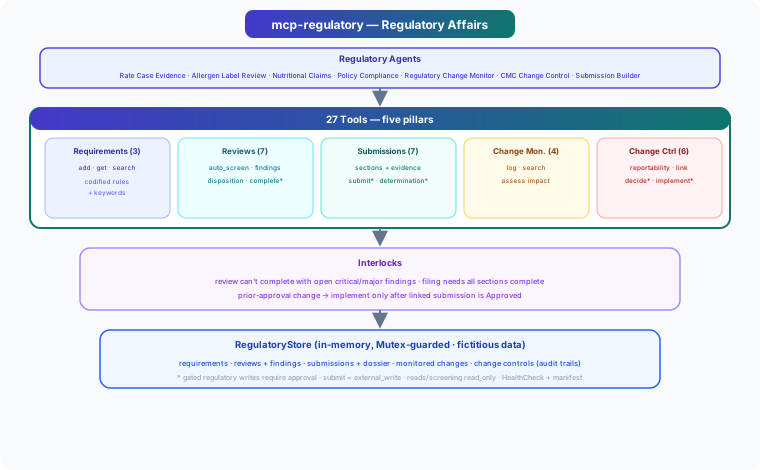
Tool catalog
What can an agent ask Regulatory MCP Server to do?
Each tool has a stable name, a human-readable purpose, and a JSON input contract discovered during MCP initialization. Risk classes come from the project’s registry manifest when one is available.
27 named tools
add_requirementAdd a regulatory requirement with citation and screening keywords
internal writeget_requirementGet a regulatory requirement
read onlysearch_requirementsSearch requirements by domain and/or text
read onlycreate_reviewCreate a compliance review of an artifact
internal writeget_reviewGet a compliance review with findings
read onlysearch_reviewsSearch compliance reviews
read onlyauto_screenScreen artifact text against active requirements (heuristic advisory findings)
read onlyadd_findingAdd a finding to a review
internal writeset_finding_dispositionSet a finding's disposition
internal writecomplete_reviewComplete a review with a verdict (gated on open serious findings)
internal writecreate_submissionCreate a regulatory submission/filing
internal writeget_submissionGet a submission with dossier sections
read onlyGovernance
Understand the effect of every tool.
A server connection inherits the authority of its credentials and deployment environment. The declarations below come from this project’s README and MCP registry manifest; your application still decides which tools an agent receives and where approval is required.
16 internal write10 read only1 external write
- Gated regulatory-significant writes — review completion, submission filing, authority determination, and change-control decision/implementation require approval in production; reads and…
- Filing is an external write — submit is classed external_write (it represents transmitting to a regulator).
- Defensible records — reviews, submissions, and change controls carry immutable audit trails.
- auto_screen is advisory — keyword screening is a triage aid, never a substitute for qualified regulatory review.
- Integration scaffold — the in-memory store is for development; back it with your real RIM/regulatory system and bind actors to authenticated identities in production.
MCP surface
What the current documentation declares.
MCP can carry tools, resources, prompts, structured results, progress, cancellation, and long-running work. This record highlights the modern protocol features explicitly mentioned by this repository.
Completion
ADK MCP SDKrmcpRegistry manifest
Install and connect
Follow the project’s documented starting point.
Install the server in the environment that owns its credentials and domain access. Add it to your MCP host, verify the discovered tools, and narrow the toolset before giving it to a production agent.
Install
cargo install mcp-regulatoryADK-Rust connection shape
let toolset = McpToolset::from_stdio(
    "mcp-regulatory",
    ["mcp-regulatory"],
).await?;

let agent = LlmAgentBuilder::new("agent")
    .tools(toolset.tools().await?)
    .build()?;
Commands and configuration are extracted from the public README. Confirm prerequisites, environment variables, and release-specific options in the official documentation before deployment.
Official documentation
Continue with the project maintainers’ source of truth.
This page provides an approachable map of the server. The repository remains authoritative for exact schemas, prerequisites, configuration, examples, tests, releases, and security updates.
Keep exploring
More in security & governance.
Approval MCP ServerA multi-stage approval workflow engine for ADK-Rust Enterprise legal and media-content agents. 17 MCP tools: configurable workflow templates, stage rules (all-of / any-of / quorum), decisions with delegation and…17 toolsCompliance MCP ServerRegulatory compliance engine for ADK-Rust Enterprise agents. Provides 27 MCP tools covering the full compliance lifecycle — frameworks, policies, controls, audits, findings, evidence collection, risk assessments, gap…27 toolsCredentials Vault MCP ServerScoped, auditable credential access for ADK-Rust Enterprise agents. Provides 8 MCP tools over 5 pluggable vault backends — never exposes raw secrets to LLM context.8 tools
Source record
Release and repository metadata for this catalog entry.
- Version
- 1.0.0
- License
- Apache-2.0
- Tools
- 27
- Revision
- 20620a68813e
- Updated
- Jun 9, 2026
Transportsstdio