Sites & assets — sites by sector (electric/gas/water/renewable); assets with operating state (in_service/out_of_service/locked_out/faulted) and lockout/tagout.
← MCP server registry
Physical & geospatialPublic source
SCADA MCP Server
A SCADA / industrial-control platform for ADK-Rust Enterprise energy & utility agents. 27 MCP tools covering sites & assets, tags/points telemetry, real-time readings + a historian, an alarm lifecycle,…
What it gives an agent
A purpose-built capability behind one MCP connection.
The server owns its domain logic and publishes a tool contract an MCP client can discover. ADK-Rust can load that contract into an agent, normalize each schema for the chosen model provider, and keep the connection lifecycle outside the agent’s business logic.
Tags / points — addressable telemetry and control points typed analog/status (read-only) or setpoint/control (writable), with engineering ranges and warn/crit thresholds.
Telemetry & historian — ingest_reading records history and auto-raises/clears threshold alarms; tag_history and tag_trend for analysis.
Alarms — lifecycle of active → acknowledged → cleared, by severity.
Control — issue_command runs the interlock chain and applies the value only on an all-pass; check_interlocks is a read-only dry-run.
Outages — report_outage auto-triages priority (P1 highest); outage_queue is the priority-ordered work queue.
Maintenance — work orders (preventive/corrective/inspection/emergency) with scheduling and assignment.
Architecture
How SCADA MCP Server fits into an agent system.
The model never needs the implementation details or credentials of the system behind the server. It sees reviewed tool definitions. The MCP client handles discovery and calls, while the server keeps ownership of validation, policy, and communication with its domain system.
01
ADK-Rust agent
Chooses a capability from the reviewed tool catalog.
02
MCP client
Discovers schemas, sends calls, and receives typed content.
03
SCADA MCP Server
Validates the request and owns 27 documented tool contracts.
04
Domain system
Keeps the API, data, credentials, and business rules behind the server.
From the project documentation
The server’s published architecture
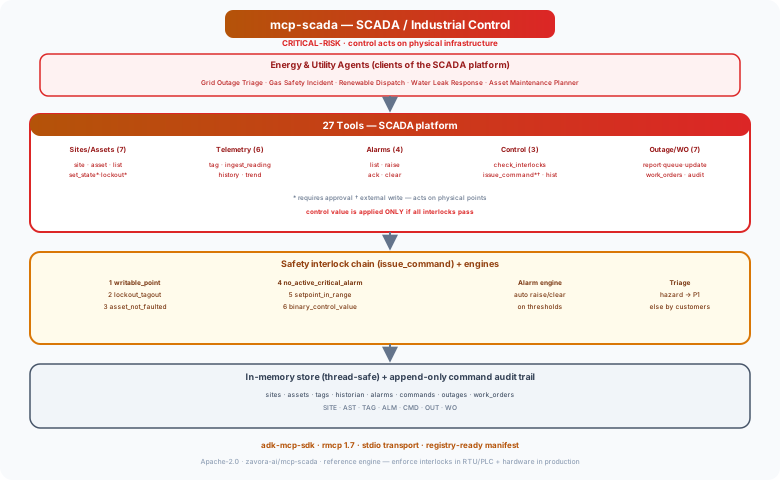
Tool catalog
What can an agent ask SCADA MCP Server to do?
Each tool has a stable name, a human-readable purpose, and a JSON input contract discovered during MCP initialization. Risk classes come from the project’s registry manifest when one is available.
27 named tools
create_siteRegister a site (substation/regulator/pump/solar)
internal writelist_sitesList sites by sector
read onlycreate_assetRegister an asset at a site
internal writeget_assetGet an asset (state, lockout)
read onlylist_assetsList assets by site/kind/state
read onlyset_asset_stateSet asset operating state (affects control interlocks)
external writeset_lockoutApply/release lockout-tagout (blocks control)
external writecreate_tagDefine a tag/point (analog/status/setpoint/control)
internal writeget_tagGet a tag's value, ranges, thresholds
read onlylist_tagsList an asset's tags with live values
read onlyingest_readingIngest a telemetry reading (auto alarm eval)
internal writetag_historyHistorian readings for a tag
read onlyGovernance
Understand the effect of every tool.
A server connection inherits the authority of its credentials and deployment environment. The declarations below come from this project’s README and MCP registry manifest; your application still decides which tools an agent receives and where approval is required.
13 read only11 internal write3 external write
- Interlock chain on every command (issue_command), checked in order; the value is applied only if all pass, and a rejected command is recorded but never executed:
- Dry-run first — check_interlocks (read-only) lets an agent confirm feasibility before requesting an approval-gated command.
- Approval-gated external writes — issue_command, set_lockout, and set_asset_state are external_write + requires_approval in the manifest; risk_level = "critical".
- Full audit trail — every command (executed and rejected) and state change is recorded (command_history, audit_log).
- Reference engine — this is an in-memory reference implementation. A production deployment must additionally enforce these interlocks at the RTU/PLC/field level and through hardware…
MCP surface
What the current documentation declares.
MCP can carry tools, resources, prompts, structured results, progress, cancellation, and long-running work. This record highlights the modern protocol features explicitly mentioned by this repository.
The current README concentrates on its tool surface. Check the source and release notes before relying on optional MCP capabilities beyond tool discovery and invocation.
ADK MCP SDKrmcpRegistry manifest
Install and connect
Follow the project’s documented starting point.
Install the server in the environment that owns its credentials and domain access. Add it to your MCP host, verify the discovered tools, and narrow the toolset before giving it to a production agent.
Install
cargo install mcp-scadaADK-Rust connection shape
let toolset = McpToolset::from_stdio(
    "mcp-scada",
    ["mcp-scada"],
).await?;

let agent = LlmAgentBuilder::new("agent")
    .tools(toolset.tools().await?)
    .build()?;
Commands and configuration are extracted from the public README. Confirm prerequisites, environment variables, and release-specific options in the official documentation before deployment.
Official documentation
Continue with the project maintainers’ source of truth.
This page provides an approachable map of the server. The repository remains authoritative for exact schemas, prerequisites, configuration, examples, tests, releases, and security updates.
Keep exploring
More in physical & geospatial.
Drone Imagery MCP ServerAn aerial inspection / drone imagery platform for ADK-Rust Enterprise energy & utility agents. 23 MCP tools covering a drone fleet, sites & inspection assets, flights/missions, geotagged imagery, detections with…23 toolsEnvironment / Runtime MCP ServerRuntime control plane for ADK-Rust Enterprise. Manages runtime environments, worker pools, deployment bundles, configuration sync, provider routing, validation gates, promotion, rollback, and configuration drift…10 toolsIoT MCP ServerIoT device management — telemetry, commands, alerts, digital twins, fleet management, OTA updates, geofencing22 tools
Source record
Release and repository metadata for this catalog entry.
- Version
- 1.0.0
- License
- Apache-2.0
- Tools
- 27
- Revision
- 3b4ced2a1bdb
- Updated
- Jun 9, 2026
Transportsstdio