Real system data — reads from actual OS commands, no mocks or seeds.
← MCP server registry
Security & governancePublic source
Device Management MCP Server
Your AI agent becomes a sysadmin. 44 MCP tools that observe, diagnose, and act on real devices — covering device management, endpoint security, and network operations in one server. Cross-platform (macOS, Linux,…
What it gives an agent
A purpose-built capability behind one MCP connection.
The server owns its domain logic and publishes a tool contract an MCP client can discover. ADK-Rust can load that contract into an agent, normalize each schema for the chosen model provider, and keep the connection lifecycle outside the agent’s business logic.
Cross-platform — macOS, Linux, Windows. Auto-detects OS and dispatches correct commands.
Observe → Diagnose → Act — full spectrum from monitoring to remediation.
MCP elicitation — destructive actions (kill, firewall, restart) prompt for user confirmation via the MCP protocol.
Enterprise backends — Intune, Jamf, Fleet, Kandji via feature flags.
Merged scope — covers Device Management (18), Endpoint Security (19), and Network (20) from the ADK-Rust Enterprise inventory.
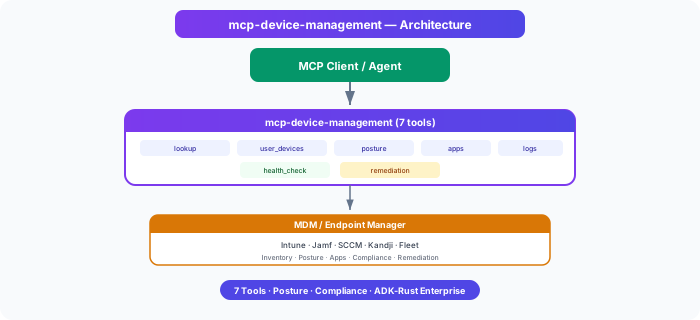
Architecture
How Device Management MCP Server fits into an agent system.
The model never needs the implementation details or credentials of the system behind the server. It sees reviewed tool definitions. The MCP client handles discovery and calls, while the server keeps ownership of validation, policy, and communication with its domain system.
01
ADK-Rust agent
Chooses a capability from the reviewed tool catalog.
02
MCP client
Discovers schemas, sends calls, and receives typed content.
03
Device Management MCP Server
Validates the request and owns 44 documented tool contracts.
04
Domain system
Keeps the API, data, credentials, and business rules behind the server.
From the project documentation
The server’s published architecture
Tool catalog
What can an agent ask Device Management MCP Server to do?
Each tool has a stable name, a human-readable purpose, and a JSON input contract discovered during MCP initialization. Risk classes come from the project’s registry manifest when one is available.
19 named tools shown from 44 documented tools
get_deviceLook up a device by ID, name, or serial number
read onlylist_user_devicesList all devices owned by a user
read onlyget_security_postureGet device security posture — encryption, firewall, antivirus, compliance
read onlylist_applicationsList installed applications on a device
read onlycollect_diagnosticsCollect diagnostic logs from a device
read onlyrun_health_checkRun a health check on a device
read onlycreate_remediationCreate a remediation task for a device
internal writeget_system_statsGet live system stats — CPU, memory, disk, load average
read onlylist_processesList top running processes by CPU or memory usage
read onlyget_network_infoGet network info — IP addresses, WiFi, VPN, active connections
read onlyget_security_statusGet full security status — FileVault/BitLocker, firewall, SIP/SELinux
read onlycheck_os_updatesCheck for available OS updates
read onlyGovernance
Understand the effect of every tool.
A server connection inherits the authority of its credentials and deployment environment. The declarations below come from this project’s README and MCP registry manifest; your application still decides which tools an agent receives and where approval is required.
12 read only4 internal write3 destructive
- The registry manifest declares read only, internal write, destructive tool risk classes.
MCP surface
What the current documentation declares.
MCP can carry tools, resources, prompts, structured results, progress, cancellation, and long-running work. This record highlights the modern protocol features explicitly mentioned by this repository.
Prompts
Elicitation
ADK MCP SDKrmcpRegistry manifest
Install and connect
Follow the project’s documented starting point.
Install the server in the environment that owns its credentials and domain access. Add it to your MCP host, verify the discovered tools, and narrow the toolset before giving it to a production agent.
Install
cargo install mcp-device-managementADK-Rust connection shape
let toolset = McpToolset::from_stdio(
    "mcp-device-management",
    ["mcp-device-management"],
).await?;

let agent = LlmAgentBuilder::new("agent")
    .tools(toolset.tools().await?)
    .build()?;
Commands and configuration are extracted from the public README. Confirm prerequisites, environment variables, and release-specific options in the official documentation before deployment.
Official documentation
Continue with the project maintainers’ source of truth.
This page provides an approachable map of the server. The repository remains authoritative for exact schemas, prerequisites, configuration, examples, tests, releases, and security updates.
Keep exploring
More in security & governance.
Approval MCP ServerA multi-stage approval workflow engine for ADK-Rust Enterprise legal and media-content agents. 17 MCP tools: configurable workflow templates, stage rules (all-of / any-of / quorum), decisions with delegation and…17 toolsCompliance MCP ServerRegulatory compliance engine for ADK-Rust Enterprise agents. Provides 27 MCP tools covering the full compliance lifecycle — frameworks, policies, controls, audits, findings, evidence collection, risk assessments, gap…27 toolsCredentials Vault MCP ServerScoped, auditable credential access for ADK-Rust Enterprise agents. Provides 8 MCP tools over 5 pluggable vault backends — never exposes raw secrets to LLM context.8 tools
Source record
Release and repository metadata for this catalog entry.
- Version
- 1.5.0
- License
- Apache-2.0
- Tools
- 44
- Revision
- 26677330194a
- Updated
- May 24, 2026
Transportsstdio