Provides a2a capabilities through a typed MCP contract.
← MCP server registry
Developer toolsPublic source
A2A Remote Agent MCP Server
Agent-to-Agent protocol management for ADK-Rust Enterprise. Discover remote agents, send tasks, stream results, and manage push notifications — across any framework that implements the A2A protocol.
What it gives an agent
A purpose-built capability behind one MCP connection.
The server owns its domain logic and publishes a tool contract an MCP client can discover. ADK-Rust can load that contract into an agent, normalize each schema for the chosen model provider, and keep the connection lifecycle outside the agent’s business logic.
Architecture
How A2A Remote Agent MCP Server fits into an agent system.
The model never needs the implementation details or credentials of the system behind the server. It sees reviewed tool definitions. The MCP client handles discovery and calls, while the server keeps ownership of validation, policy, and communication with its domain system.
01
ADK-Rust agent
Chooses a capability from the reviewed tool catalog.
02
MCP client
Discovers schemas, sends calls, and receives typed content.
03
A2A Remote Agent MCP Server
Validates the request and owns 11 documented tool contracts.
04
Domain system
Keeps the API, data, credentials, and business rules behind the server.
From the project documentation
The server’s published architecture
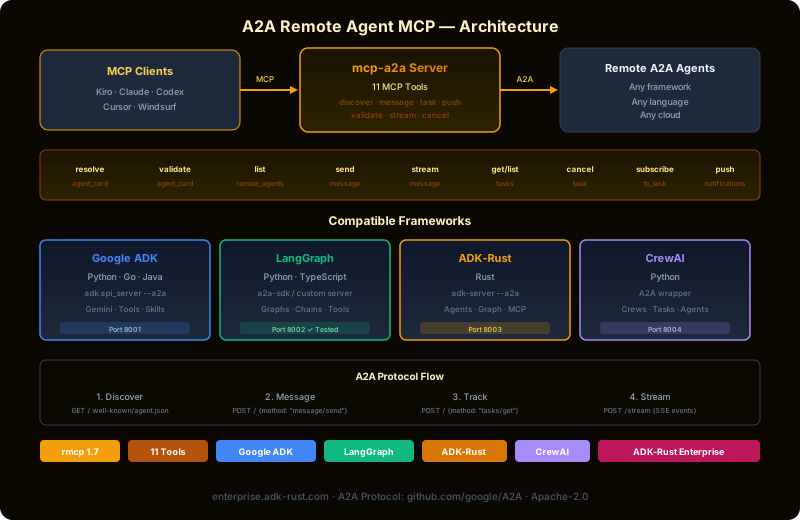
Tool catalog
What can an agent ask A2A Remote Agent MCP Server to do?
Each tool has a stable name, a human-readable purpose, and a JSON input contract discovered during MCP initialization. Risk classes come from the project’s registry manifest when one is available.
11 named tools
fetch_agent_cardFetch /.well-known/agent-card.json from a remote agent
read onlyvalidate_agent_cardVerify signature, version, auth, and capabilities of an agent card
read onlylist_agentsShow configured remote agents
read onlysend_taskCreate or continue a remote A2A task
external writesend_task_streamingStart remote task with streaming updates
external writeget_taskFetch task state and history
read onlylist_tasksPage and filter remote task registry
read onlycancel_taskCancel running remote task
external writesubscribe_eventsOpen SSE subscription for task events
read onlymanage_push_notificationsCreate, update, or delete push notification configs
internal writeget_agent_capabilitiesFetch private agent capabilities (extended card)
read onlyGovernance
Understand the effect of every tool.
A server connection inherits the authority of its credentials and deployment environment. The declarations below come from this project’s README and MCP registry manifest; your application still decides which tools an agent receives and where approval is required.
7 read only3 external write1 internal write
- Protocol version validation — reject incompatible agents
- Tenant-scoped auth — isolation headers for multi-tenant deployments
- Remote task limits — rate limiting per agent
- Audit logging — all A2A interactions recorded
MCP surface
What the current documentation declares.
MCP can carry tools, resources, prompts, structured results, progress, cancellation, and long-running work. This record highlights the modern protocol features explicitly mentioned by this repository.
Subscriptions
Long-running tasks
ADK MCP SDKrmcpRegistry manifest
Install and connect
Follow the project’s documented starting point.
Install the server in the environment that owns its credentials and domain access. Add it to your MCP host, verify the discovered tools, and narrow the toolset before giving it to a production agent.
Install
cargo install mcp-a2aADK-Rust connection shape
let toolset = McpToolset::from_stdio(
    "mcp-a2a",
    ["mcp-a2a"],
).await?;

let agent = LlmAgentBuilder::new("agent")
    .tools(toolset.tools().await?)
    .build()?;
Commands and configuration are extracted from the public README. Confirm prerequisites, environment variables, and release-specific options in the official documentation before deployment.
Official documentation
Continue with the project maintainers’ source of truth.
This page provides an approachable map of the server. The repository remains authoritative for exact schemas, prerequisites, configuration, examples, tests, releases, and security updates.
Keep exploring
More in developer tools.
ACP Workspace MCP ServerEnterprise control plane for ACP (Agent Client Protocol) sessions in ADK-Rust Enterprise. Provides 9 MCP tools for managing coding delegates — permission gates, patch review, session lifecycle, and agent exposure.9 toolsCI/CD MCP ServerGive your AI agents visibility into CI/CD pipelines. This MCP server connects to GitHub Actions so agents can check build status, read logs, download artifacts, trigger deployments, and re-run failed jobs — all through…8 toolsCode Search MCP ServerSemantic code search, symbol lookup, call graphs, dependency graphs, ownership maps, and context pack generation for ADK-Rust Enterprise agents. Provides 8 MCP tools that work against any local workspace.8 tools
Source record
Release and repository metadata for this catalog entry.
- Version
- 1.2.0
- License
- Apache-2.0
- Tools
- 11
- Revision
- 42e9cc13c9f2
- Updated
- May 24, 2026
Transportsstdiostreamable HTTPSSE