Assets — any media type, rich custom metadata (arbitrary JSON), lifecycle status (draft → in_review → approved → published → archived → expired), and a full provenance audit trail
← MCP server registry
Data & contentPublic source
DAM MCP Server
A full Digital Asset Management platform for ADK-Rust Enterprise agents. 23 MCP tools covering the complete asset lifecycle — ingest, rich metadata & tagging, versions & renditions, collections, rights/licensing with…
What it gives an agent
A purpose-built capability behind one MCP connection.
The server owns its domain logic and publishes a tool contract an MCP client can discover. ADK-Rust can load that contract into an agent, normalize each schema for the chosen model provider, and keep the connection lifecycle outside the agent’s business logic.
Tagging — faceted tags (keyword/color/subject/campaign), human or auto_tag (heuristic keyword + type derivation, a stand-in for an ML tagger)
Versions & renditions — master-file versioning plus derivatives (thumbnails, web/print variants, transcodes)
Collections — albums and smart collections, nestable
Rights & licensing — license terms, channels, territories, expiry; clearance gating and a check_usage_rights decision
Review — brand/legal/editorial reviews with outcomes feeding the approval gate
Distribution — share links/portals and usage tracking (where each asset was published), gated by rights
Architecture
How DAM MCP Server fits into an agent system.
The model never needs the implementation details or credentials of the system behind the server. It sees reviewed tool definitions. The MCP client handles discovery and calls, while the server keeps ownership of validation, policy, and communication with its domain system.
01
ADK-Rust agent
Chooses a capability from the reviewed tool catalog.
02
MCP client
Discovers schemas, sends calls, and receives typed content.
03
DAM MCP Server
Validates the request and owns 23 documented tool contracts.
04
Domain system
Keeps the API, data, credentials, and business rules behind the server.
From the project documentation
The server’s published architecture
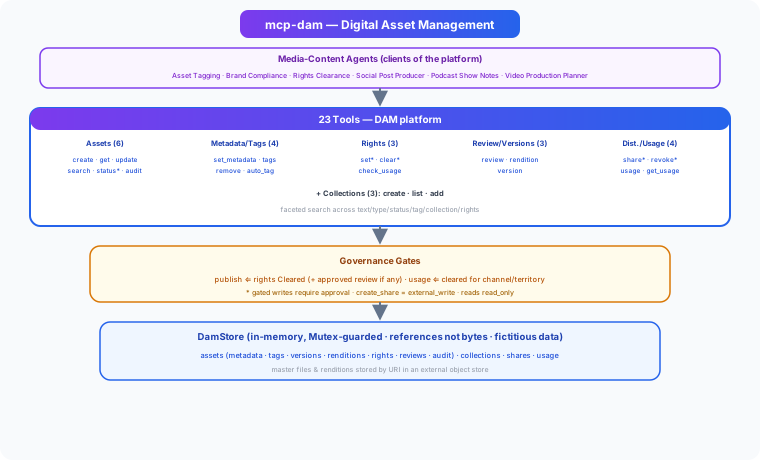
Tool catalog
What can an agent ask DAM MCP Server to do?
Each tool has a stable name, a human-readable purpose, and a JSON input contract discovered during MCP initialization. Risk classes come from the project’s registry manifest when one is available.
23 named tools
create_assetIngest a new digital asset with its master file URI
internal writeget_assetGet an asset's full record
read onlyupdate_assetUpdate an asset's title/description
internal writesearch_assetsFaceted asset search across text/type/status/tag/collection/rights
read onlyset_statusTransition asset lifecycle status (publish gated on rights + review)
internal writeget_audit_trailGet an asset's audit trail (provenance)
read onlyset_metadataSet/merge custom metadata on an asset
internal writeadd_tagsAdd tags to an asset
internal writeremove_tagRemove a tag from an asset
internal writeauto_tagAuto-derive candidate tags from an asset's text and type (heuristic)
internal writeset_rightsSet the full rights record on an asset
internal writeclear_rightsClear an asset for use with license terms (gated)
internal writeGovernance
Understand the effect of every tool.
A server connection inherits the authority of its credentials and deployment environment. The declarations below come from this project’s README and MCP registry manifest; your application still decides which tools an agent receives and where approval is required.
16 internal write6 read only1 external write
- Publish requires rights = Cleared, and if any review exists it must be approved (no open rejections/changes).
- Recording usage is refused unless the asset is usable on that channel right now (status, expiry, channel & territory).
- Rights, publish, and share writes are gated for approval in production; create_share is classed external_write.
MCP surface
What the current documentation declares.
MCP can carry tools, resources, prompts, structured results, progress, cancellation, and long-running work. This record highlights the modern protocol features explicitly mentioned by this repository.
The current README concentrates on its tool surface. Check the source and release notes before relying on optional MCP capabilities beyond tool discovery and invocation.
ADK MCP SDKrmcpRegistry manifest
Install and connect
Follow the project’s documented starting point.
Install the server in the environment that owns its credentials and domain access. Add it to your MCP host, verify the discovered tools, and narrow the toolset before giving it to a production agent.
Install
cargo install mcp-damADK-Rust connection shape
let toolset = McpToolset::from_stdio(
    "mcp-dam",
    ["mcp-dam"],
).await?;

let agent = LlmAgentBuilder::new("agent")
    .tools(toolset.tools().await?)
    .build()?;
Commands and configuration are extracted from the public README. Confirm prerequisites, environment variables, and release-specific options in the official documentation before deployment.
Official documentation
Continue with the project maintainers’ source of truth.
This page provides an approachable map of the server. The repository remains authoritative for exact schemas, prerequisites, configuration, examples, tests, releases, and security updates.
Keep exploring
More in data & content.
ADK Rust MCP ToolkitProduction-ready Model Context Protocol (MCP) servers for generative media, built in Rust. Generate images, videos, music, and speech through a unified, provider-agnostic interface.44 toolsArtifact Store MCP ServerGoverned artifact registry for ADK-Rust Enterprise agents. Content-immutable, versioned, provenance-linked, hash-verified artifacts with policy-driven lifecycle.15 toolsContent Management MCP ServerUnified content platform for AI agents — manage articles, social media, YouTube videos, media library, SEO, and publishing workflows from a single MCP server. 26 tools across content, social, and video.26 tools
Source record
Release and repository metadata for this catalog entry.
- Version
- 1.0.0
- License
- Apache-2.0
- Tools
- 23
- Revision
- 1df7cbe3698b
- Updated
- Jun 9, 2026
Transportsstdio