Intent-based — agents create payment intents, never execute payments directly
← MCP server registry
Business operationsPublic source
MCP Payments
Governed Payment Operations MCP — payment intents, approval gates, evidence, reconciliation, and audit for AI agents
What it gives an agent
A purpose-built capability behind one MCP connection.
The server owns its domain logic and publishes a tool contract an MCP client can discover. ADK-Rust can load that contract into an agent, normalize each schema for the chosen model provider, and keep the connection lifecycle outside the agent’s business logic.
No direct execution — every financial action passes through policy evaluation and approval gates
i64 money — all amounts in minor units (cents/pence), no floating point, no rounding errors
No secrets — credentials stay in vault references, never in tool parameters or responses
Idempotency — every write tool requires an idempotency_key to prevent duplicate operations
Audit trail — every action records actor, reason, and timestamp for compliance
Architecture
How MCP Payments fits into an agent system.
The model never needs the implementation details or credentials of the system behind the server. It sees reviewed tool definitions. The MCP client handles discovery and calls, while the server keeps ownership of validation, policy, and communication with its domain system.
01
ADK-Rust agent
Chooses a capability from the reviewed tool catalog.
02
MCP client
Discovers schemas, sends calls, and receives typed content.
03
MCP Payments
Validates the request and owns 10 documented tool contracts.
04
Domain system
Keeps the API, data, credentials, and business rules behind the server.
From the project documentation
The server’s published architecture
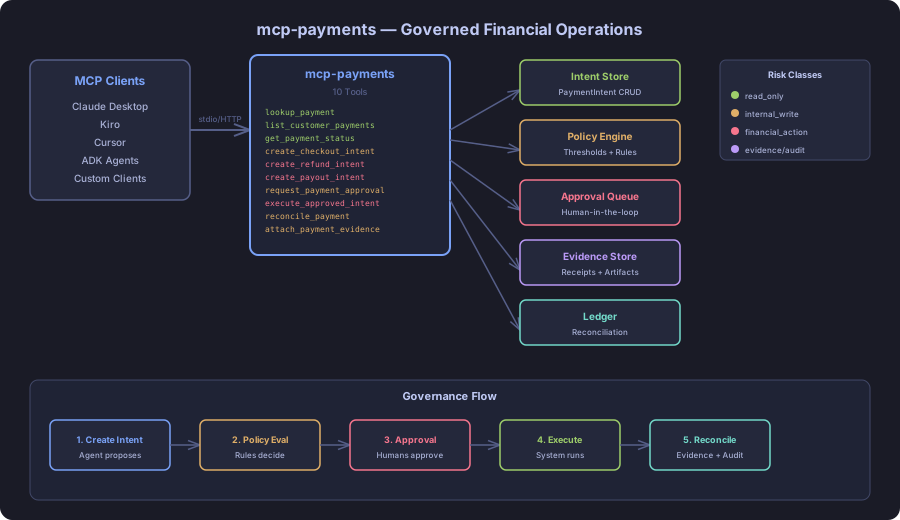
Tool catalog
What can an agent ask MCP Payments to do?
Each tool has a stable name, a human-readable purpose, and a JSON input contract discovered during MCP initialization. Risk classes come from the project’s registry manifest when one is available.
10 named tools
lookup_paymentLook up a payment intent by ID
read onlylist_customer_paymentsList all payments for a customer
read onlyget_payment_statusGet the current status of a payment intent
read onlycreate_checkout_intentCreate a checkout payment intent (Draft). Amounts > 10000 minor units require approval.
internal writecreate_refund_intentCreate a refund intent for an existing payment. Direction=Outbound.
financial actioncreate_payout_intentCreate a payout intent. Direction=Outbound. Always requires approval.
financial actionrequest_payment_approvalRequest approval for a Draft payment intent. Moves Draft → PendingApproval.
internal writeexecute_approved_intentExecute an approved payment intent. ONLY works if status=Approved.
financial actionreconcile_paymentReconcile a payment against an order/invoice reference.
internal writeattach_payment_evidenceAttach evidence artifact to a payment intent for audit trail.
internal writeGovernance
Understand the effect of every tool.
A server connection inherits the authority of its credentials and deployment environment. The declarations below come from this project’s README and MCP registry manifest; your application still decides which tools an agent receives and where approval is required.
4 internal write3 read only3 financial action
- Actor identification — every write requires actor field identifying who/what initiated
- Reason logging — every write requires reason explaining business justification
- Idempotency — every write requires idempotency_key preventing duplicate execution
- Amount thresholds — checkout intents 10,000 minor units automatically require approval
- Refund approval — all refunds require finance_manager approval
- Payout approval — all payouts require finance_manager + compliance_officer approval
MCP surface
What the current documentation declares.
MCP can carry tools, resources, prompts, structured results, progress, cancellation, and long-running work. This record highlights the modern protocol features explicitly mentioned by this repository.
Subscriptions
ADK MCP SDKrmcpRegistry manifest
Install and connect
Follow the project’s documented starting point.
Install the server in the environment that owns its credentials and domain access. Add it to your MCP host, verify the discovered tools, and narrow the toolset before giving it to a production agent.
Install
cargo install mcp-paymentsMCP client configuration
{
  "mcpServers": {
    "payments": {
      "command": "mcp-payments",
      "args": [],
      "env": {}
    }
  }
}
Commands and configuration are extracted from the public README. Confirm prerequisites, environment variables, and release-specific options in the official documentation before deployment.
Official documentation
Continue with the project maintainers’ source of truth.
This page provides an approachable map of the server. The repository remains authoritative for exact schemas, prerequisites, configuration, examples, tests, releases, and security updates.
Keep exploring
More in business operations.
Ads MCP ServerA digital advertising platform for ADK-Rust Enterprise sales & marketing agents. 19 MCP tools covering campaigns, ad groups, ads/creatives, budgets and bids, audiences, daily performance metrics with derived KPIs…19 toolsAnalytics MCP ServerGoverned analytics platform for AI agents — metrics, dashboards, funnels, cohorts, anomaly detection, forecasting, and policy enforcement. 28 tools with full audit trail.28 toolsBanking MCP ServerUnified banking MCP server with 15 tools across 3 backends — Plaid (US/Canada/EU), Mono (Africa), and Open Banking (UK/EU PSD2). Accounts, transactions, balances, payments, identity, and statements.15 tools
Source record
Release and repository metadata for this catalog entry.
- Version
- 2.0.0
- License
- Apache-2.0
- Tools
- 10
- Revision
- ddff90892cf2
- Updated
- May 24, 2026
Transportsstdio