Item bank — six item types: multiple_choice, multiple_select, true_false, short_answer, numeric (with tolerance), and essay (rubric-scored). Items carry difficulty, Bloom's cognitive level,…
← MCP server registry
Industry solutionsPublic source
Assessment MCP Server
An assessment platform for ADK-Rust Enterprise education agents. 23 MCP tools covering an item bank (six item types with keyed answers), standards/curriculum mapping, assessment authoring + blueprint generation, rubric…
What it gives an agent
A purpose-built capability behind one MCP connection.
The server owns its domain logic and publishes a tool contract an MCP client can discover. ADK-Rust can load that contract into an agent, normalize each schema for the chosen model provider, and keep the connection lifecycle outside the agent’s business logic.
Standards / curriculum mapping — learning standards (CCSS/NGSS/custom) with items_for_standard coverage and per-assessment standard breakdowns.
Authoring & generation — build assessments from explicit items, or generate from a blueprint (difficulty → count, optionally constrained to standards) drawing from the bank.
Attempts & grading — learner attempts auto-grade objective items on submit; rubric/essay items are scored per-criterion (clamped to each criterion's max) and the attempt finalizes with…
Psychometrics — item_analysis computes per-item p-value (difficulty) and discrimination (top-third vs bottom-third correct-rate) with quality flags (too_hard / too_easy /…
Architecture
How Assessment MCP Server fits into an agent system.
The model never needs the implementation details or credentials of the system behind the server. It sees reviewed tool definitions. The MCP client handles discovery and calls, while the server keeps ownership of validation, policy, and communication with its domain system.
01
ADK-Rust agent
Chooses a capability from the reviewed tool catalog.
02
MCP client
Discovers schemas, sends calls, and receives typed content.
03
Assessment MCP Server
Validates the request and owns 23 documented tool contracts.
04
Domain system
Keeps the API, data, credentials, and business rules behind the server.
From the project documentation
The server’s published architecture
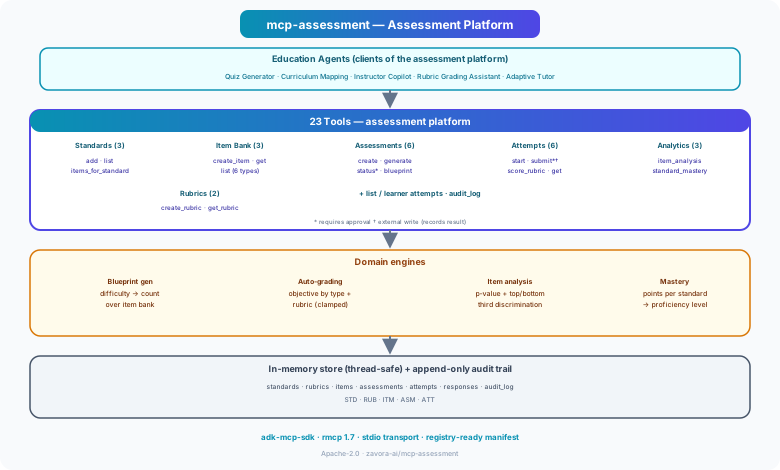
Tool catalog
What can an agent ask Assessment MCP Server to do?
Each tool has a stable name, a human-readable purpose, and a JSON input contract discovered during MCP initialization. Risk classes come from the project’s registry manifest when one is available.
23 named tools
add_standardAdd a learning standard (curriculum target)
internal writelist_standardsList learning standards by subject/framework
read onlyitems_for_standardList items aligned to a standard (coverage)
read onlycreate_rubricCreate a rubric with weighted criteria
internal writeget_rubricGet a rubric by id
read onlycreate_itemAuthor an item (question) of any supported type
internal writeget_itemGet an item by id (instructor-facing, includes key)
read onlylist_itemsSearch the item bank by subject/difficulty/standard
read onlycreate_assessmentCreate an assessment from explicit item ids
internal writegenerate_assessmentGenerate an assessment from a difficulty blueprint
internal writeget_assessmentGet an assessment by id
read onlylist_assessmentsList assessments by subject/status
read onlyGovernance
Understand the effect of every tool.
A server connection inherits the authority of its credentials and deployment environment. The declarations below come from this project’s README and MCP registry manifest; your application still decides which tools an agent receives and where approval is required.
14 read only8 internal write1 external write
- Two writes are gated (requires_approval): publishing an assessment (set_assessment_status → published — makes it live for learners) and submitting an attempt (submit_attempt, classed…
- Publishing is guarded — an assessment can't be published with no items, and only published assessments accept attempts.
- All analytics and bank queries are read_only.
- Everything is audited (audit_log). Sample data is fictitious.
MCP surface
What the current documentation declares.
MCP can carry tools, resources, prompts, structured results, progress, cancellation, and long-running work. This record highlights the modern protocol features explicitly mentioned by this repository.
The current README concentrates on its tool surface. Check the source and release notes before relying on optional MCP capabilities beyond tool discovery and invocation.
ADK MCP SDKrmcpRegistry manifest
Install and connect
Follow the project’s documented starting point.
Install the server in the environment that owns its credentials and domain access. Add it to your MCP host, verify the discovered tools, and narrow the toolset before giving it to a production agent.
Install
cargo install mcp-assessmentADK-Rust connection shape
let toolset = McpToolset::from_stdio(
    "mcp-assessment",
    ["mcp-assessment"],
).await?;

let agent = LlmAgentBuilder::new("agent")
    .tools(toolset.tools().await?)
    .build()?;
Commands and configuration are extracted from the public README. Confirm prerequisites, environment variables, and release-specific options in the official documentation before deployment.
Official documentation
Continue with the project maintainers’ source of truth.
This page provides an approachable map of the server. The repository remains authoritative for exact schemas, prerequisites, configuration, examples, tests, releases, and security updates.
Keep exploring
More in industry solutions.
Agriculture MCP ServerFull-stack agriculture MCP server with 35 tools — farm management, weather intelligence, satellite imagery, commodity markets, IoT sensors, and yield forecasting. Includes a built-in example AgTech backend with…35 toolsEHR MCP ServerAn Electronic Health Record integration layer for ADK-Rust Enterprise clinical agents. 25 MCP tools spanning the patient chart — demographics, encounters, problems, medications, results, notes, care gaps, quality…26 toolsLegal Reference MCP ServerGoverned, global legal reference data for ADK-Rust Enterprise agents. Provides 24 MCP tools across 14 jurisdictions — retrieves and structures legal information without providing legal advice.14 tools
Source record
Release and repository metadata for this catalog entry.
- Version
- 1.0.0
- License
- Apache-2.0
- Tools
- 23
- Revision
- cfdb211393e0
- Updated
- Jun 9, 2026
Transportsstdio