Catalog — parts with part number, category, unit, cost, preferred supplier, and lead time; lifecycle status (active/superseded/obsolete).
← MCP server registry
Physical & geospatialPublic source
Parts MCP Server
A parts & spares platform for ADK-Rust Enterprise automotive and manufacturing agents. 27 MCP tools covering a parts catalog, multi-location inventory with reorder points, bill-of-materials & where-used, supersession…
What it gives an agent
A purpose-built capability behind one MCP connection.
The server owns its domain logic and publishes a tool contract an MCP client can discover. ADK-Rust can load that contract into an agent, normalize each schema for the chosen model provider, and keep the connection lifecycle outside the agent’s business logic.
Multi-location inventory — stock per part per location with on-hand, reserved, and a reorder policy (point + qty). stock_for_part totals availability across locations.
Stock movements — receive_stock, issue_stock, transfer_stock, adjust_stock, each recorded immutably. Issue/transfer/reserve refuse to oversell available stock; adjustments can't drive…
Reservations — commit available stock against a work order/asset without removing on-hand; cancel to release.
BOM & where-used — bill-of-materials with recursive explosion (qty-multiplied) and cycle prevention; reverse where_used lookup.
Supersession — old→new replacement chains; resolve_supersession follows the chain to the current active part.
Reorder & forecasting — reorder_suggestions flags stock at/below its reorder point; forecast_demand derives average daily usage from history, projects demand, recommends a reorder point…
Architecture
How Parts MCP Server fits into an agent system.
The model never needs the implementation details or credentials of the system behind the server. It sees reviewed tool definitions. The MCP client handles discovery and calls, while the server keeps ownership of validation, policy, and communication with its domain system.
01
ADK-Rust agent
Chooses a capability from the reviewed tool catalog.
02
MCP client
Discovers schemas, sends calls, and receives typed content.
03
Parts MCP Server
Validates the request and owns 27 documented tool contracts.
04
Domain system
Keeps the API, data, credentials, and business rules behind the server.
From the project documentation
The server’s published architecture
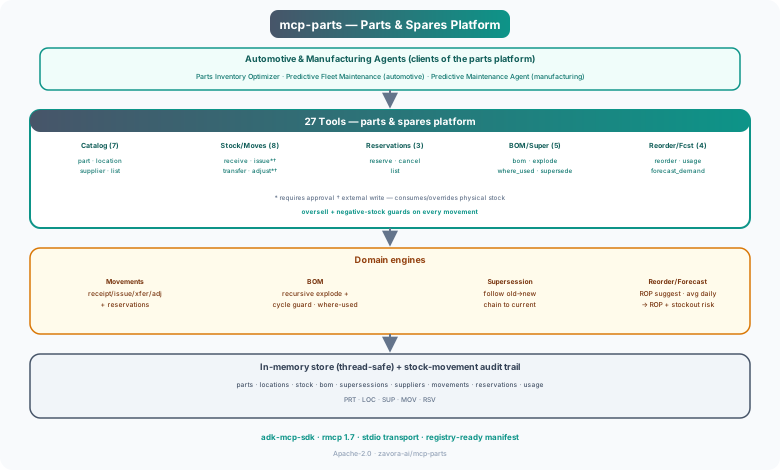
Tool catalog
What can an agent ask Parts MCP Server to do?
Each tool has a stable name, a human-readable purpose, and a JSON input contract discovered during MCP initialization. Risk classes come from the project’s registry manifest when one is available.
27 named tools
create_partCreate a part in the catalog
internal writeget_partGet a part by id or part number
read onlylist_partsList parts by category/status
read onlycreate_locationCreate a stocking location
internal writelist_locationsList stocking locations
read onlycreate_supplierCreate a supplier
internal writelist_suppliersList suppliers
read onlyset_stock_policySet reorder point + reorder qty for a part at a location
internal writeget_stockGet stock of a part at a location
read onlystock_for_partStock across locations + total available
read onlyreceive_stockReceive stock into a location
internal writeissue_stockIssue/consume stock (physical) — gated
external writeGovernance
Understand the effect of every tool.
A server connection inherits the authority of its credentials and deployment environment. The declarations below come from this project’s README and MCP registry manifest; your application still decides which tools an agent receives and where approval is required.
14 read only11 internal write2 external write
- Two writes consume physical stock and are gated (requires_approval, external_write): issue_stock (parts consumed/installed — also records usage) and adjust_stock (overrides recorded…
- Movement integrity — oversell and negative-stock guards on every movement; every movement and adjustment is on the audit trail (audit_log).
- Reads are read_only. Sample data is fictitious.
MCP surface
What the current documentation declares.
MCP can carry tools, resources, prompts, structured results, progress, cancellation, and long-running work. This record highlights the modern protocol features explicitly mentioned by this repository.
The current README concentrates on its tool surface. Check the source and release notes before relying on optional MCP capabilities beyond tool discovery and invocation.
ADK MCP SDKrmcpRegistry manifest
Install and connect
Follow the project’s documented starting point.
Install the server in the environment that owns its credentials and domain access. Add it to your MCP host, verify the discovered tools, and narrow the toolset before giving it to a production agent.
Install
cargo install mcp-partsADK-Rust connection shape
let toolset = McpToolset::from_stdio(
    "mcp-parts",
    ["mcp-parts"],
).await?;

let agent = LlmAgentBuilder::new("agent")
    .tools(toolset.tools().await?)
    .build()?;
Commands and configuration are extracted from the public README. Confirm prerequisites, environment variables, and release-specific options in the official documentation before deployment.
Official documentation
Continue with the project maintainers’ source of truth.
This page provides an approachable map of the server. The repository remains authoritative for exact schemas, prerequisites, configuration, examples, tests, releases, and security updates.
Keep exploring
More in physical & geospatial.
Drone Imagery MCP ServerAn aerial inspection / drone imagery platform for ADK-Rust Enterprise energy & utility agents. 23 MCP tools covering a drone fleet, sites & inspection assets, flights/missions, geotagged imagery, detections with…23 toolsEnvironment / Runtime MCP ServerRuntime control plane for ADK-Rust Enterprise. Manages runtime environments, worker pools, deployment bundles, configuration sync, provider routing, validation gates, promotion, rollback, and configuration drift…10 toolsIoT MCP ServerIoT device management — telemetry, commands, alerts, digital twins, fleet management, OTA updates, geofencing22 tools
Source record
Release and repository metadata for this catalog entry.
- Version
- 1.0.0
- License
- Apache-2.0
- Tools
- 27
- Revision
- 45dbea177b42
- Updated
- Jun 9, 2026
Transportsstdio