Server API
The ADK-Rust server provides a REST API for running agents, managing sessions, and accessing artifacts. When you deploy your agent using the Launcher in server mode, it exposes these endpoints along with a web UI.
Overview
The server is built on Axum and provides:
- REST API: HTTP endpoints for agent execution and session management
- Server-Sent Events (SSE): Real-time streaming of agent responses
- Web UI: Interactive browser-based interface
- CORS Support: Cross-origin requests enabled
- Telemetry: Built-in observability with tracing
ServerConfig also exposes runner-level passthrough for long-running
deployments:
let config = ServerConfig::new(agent_loader, session_service)
    .with_compaction(compaction_config)
    .with_context_cache(context_cache_config, cache_capable_model);
Starting the Server
Use the Launcher to start the server:
use adk_rust::prelude::*;
use adk_rust::Launcher;
use std::sync::Arc;

#[tokio::main]
async fn main() -> Result<()> {
    let api_key = std::env::var("GOOGLE_API_KEY")?;
    let model = Arc::new(GeminiModel::new(&api_key, "gemini-3.7-flash")?);

    let agent = LlmAgentBuilder::new("my_agent")
        .description("A helpful assistant")
        .instruction("You are a helpful assistant.")
        .model(model)
        .build()?;

    Launcher::new(Arc::new(agent)).run().await
}
Start from the validated API scaffold:
cargo adk new my-api --template api
cd my-api
cargo run
REST API Endpoints
Health Check
Check if the server is running:
GET /api/healthResponse:
OKRun Agent with Streaming
Execute an agent and stream responses using Server-Sent Events:
POST /api/run_sseRequest Body:
{
  "appName": "my_agent",
  "userId": "user123",
  "sessionId": "session456",
  "newMessage": {
    "role": "user",
    "parts": [
      {
        "text": "What is the capital of France?"
      }
    ]
  },
  "streaming": true
}
Response:
- Content-Type:
text/event-stream - Streams events as JSON objects
Event Format:
{
  "id": "evt_123",
  "timestamp": 1234567890,
  "author": "my_agent",
  "content": {
    "role": "model",
    "parts": [
      {
        "text": "The capital of France is Paris."
      }
    ]
  },
  "actions": {},
  "llm_response": {
    "content": {
      "role": "model",
      "parts": [
        {
          "text": "The capital of France is Paris."
        }
      ]
    }
  }
}
Run Agent (Non-Streaming)
Execute an agent to completion and receive all events in a single JSON response:
POST /api/runRequest Body: same shape as POST /api/run_sse (the streaming field is ignored):
{
  "appName": "my_agent",
  "userId": "user123",
  "sessionId": "session456",
  "newMessage": {
    "role": "user",
    "parts": [
      {
        "text": "What is the capital of France?"
      }
    ]
  }
}
Response:
- Content-Type:
application/json - A JSON array containing every event produced by the run, in order, using the same event format as
/api/run_sse
This endpoint mirrors Google ADK's api_server non-streaming /run route.
Session Management
Create Session
Create a new session:
POST /api/sessionsRequest Body:
{
  "appName": "my_agent",
  "userId": "user123",
  "sessionId": "session456"
}
Response:
{
  "id": "session456",
  "appName": "my_agent",
  "userId": "user123",
  "lastUpdateTime": 1234567890,
  "events": [],
  "state": {}
}
Get Session
Retrieve session details:
GET /api/sessions/:app_name/:user_id/:session_idResponse:
{
  "id": "session456",
  "appName": "my_agent",
  "userId": "user123",
  "lastUpdateTime": 1234567890,
  "events": [],
  "state": {}
}
Delete Session
Delete a session:
DELETE /api/sessions/:app_name/:user_id/:session_idResponse:
- Status:
204 No Content
List Sessions
List all sessions for a user:
GET /api/apps/:app_name/users/:user_id/sessionsResponse:
[
  {
    "id": "session456",
    "appName": "my_agent",
    "userId": "user123",
    "lastUpdateTime": 1234567890,
    "events": [],
    "state": {}
  }
]
Artifact Management
List Artifacts
List all artifacts for a session:
GET /api/sessions/:app_name/:user_id/:session_id/artifactsResponse:
[
  "image1.png",
  "document.pdf",
  "data.json"
]
Get Artifact
Download an artifact:
GET /api/sessions/:app_name/:user_id/:session_id/artifacts/:artifact_nameResponse:
- Content-Type: Determined by file extension
- Body: Binary or text content
Application Management
List Applications
List all available agents:
GET /api/apps
GET /api/list-apps  (legacy compatibility)
Response:
{
  "apps": [
    {
      "name": "my_agent",
      "description": "A helpful assistant"
    }
  ]
}
Web UI
The server includes a built-in web UI accessible at:
http://localhost:8080/ui/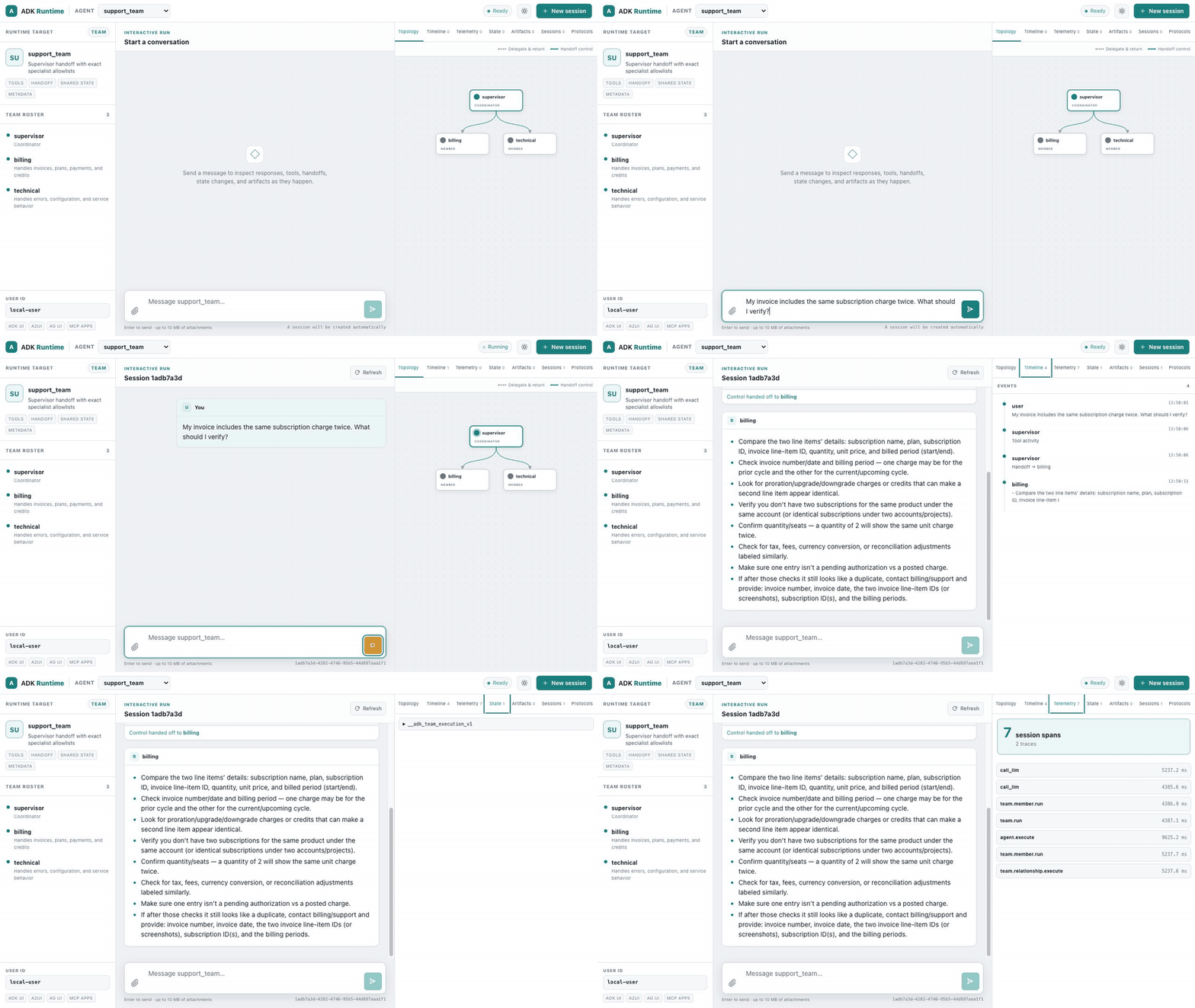
The five-minute quickstart scaffolds an OpenAI-backed server and opens this interface with four commands. The recording uses a team to make the active topology edge visible; leaf agents, tools, graphs, workflows, realtime agents, and remote agents use the same interface.
Features
- Interactive Runs: Send messages and attachments and inspect safely rendered Markdown, streaming text, tool calls, failures, and handoffs
- Session Management: Create, view, and switch between sessions
- Portable Team Topology: Distinguish exact delegation-and-return edges from control handoffs, with Studio Next-style animation for the active member and incoming edge
- Runtime Inspector: Inspect ordered events, dedicated telemetry spans, shared/session state, configured runtime services, A2A discovery, and UI/MCP Apps protocol support
- Realtime Playback: Recognize realtime agents, merge transcript deltas, and play completed PCM output as WAV audio
- Artifact Viewer: View and download session artifacts
- Responsive Themes: Keyboard-accessible system, light, and dark layouts with no external assets
UI Routes
/- Redirects to/ui//ui/- Main chat interface/ui/assets/*- Static assets (CSS, JS, images)/ui/assets/config/runtime-config.json- Runtime configuration/api/ui/agents/{name}- Agent capabilities, hierarchy, and portable topology metadata
The interface is maintained in adk-server/webui and its production build is
embedded in the server crate, so generated projects and deployments use the
same runtime UI without a separate frontend service.
The runnable runtime UI showcase
includes separate OpenAI-backed walkthroughs and screenshots for a tool-calling
agent, a deterministic graph workflow, and a portable handoff team. The
advanced agent gallery adds an
ambient schedule, OpenAI Realtime voice playback, A2A discovery, MCP
2026-07-28 discovery with SEP-2663 tasks, and configured telemetry, artifact,
and memory services in one server. The ADK Runtime brand links to
adk-rust.com in a new tab.
Client Examples
JavaScript/TypeScript
Using the Fetch API with SSE:
async function runAgent(message) {
  const response = await fetch('http://localhost:8080/api/run_sse', {
    method: 'POST',
    headers: {
      'Content-Type': 'application/json',
    },
    body: JSON.stringify({
      appName: 'my_agent',
      userId: 'user123',
      sessionId: 'session456',
      newMessage: {
        role: 'user',
        parts: [{ text: message }]
      },
      streaming: true
    })
  });

  const reader = response.body.getReader();
  const decoder = new TextDecoder();

  while (true) {
    const { done, value } = await reader.read();
    if (done) break;

    const chunk = decoder.decode(value);
    const lines = chunk.split('\n');

    for (const line of lines) {
      if (line.startsWith('data: ')) {
        const event = JSON.parse(line.slice(6));
        console.log('Event:', event);
      }
    }
  }
}
Python
Using the requests library:
import requests
import json

def run_agent(message):
    url = 'http://localhost:8080/api/run_sse'
    payload = {
        'appName': 'my_agent',
        'userId': 'user123',
        'sessionId': 'session456',
        'newMessage': {
            'role': 'user',
            'parts': [{'text': message}]
        },
        'streaming': True
    }

    response = requests.post(url, json=payload, stream=True)

    for line in response.iter_lines():
        if line:
            line_str = line.decode('utf-8')
            if line_str.startswith('data: '):
                event = json.loads(line_str[6:])
                print('Event:', event)

run_agent('What is the capital of France?')
cURL
# Create session
curl -X POST http://localhost:8080/api/sessions \
  -H "Content-Type: application/json" \
  -d '{
    "appName": "my_agent",
    "userId": "user123",
    "sessionId": "session456"
  }'

# Run agent with streaming
curl -X POST http://localhost:8080/api/run_sse \
  -H "Content-Type: application/json" \
  -d '{
    "appName": "my_agent",
    "userId": "user123",
    "sessionId": "session456",
    "newMessage": {
      "role": "user",
      "parts": [{"text": "What is the capital of France?"}]
    },
    "streaming": true
  }'
Server Configuration
Custom Port
For a custom port, set PORT before starting the generated server:
PORT=3000 cargo runCustom Artifact Service
Provide your own artifact service:
use adk_artifact::InMemoryArtifactService;

let artifact_service = Arc::new(InMemoryArtifactService::new());

Launcher::new(Arc::new(agent))
    .with_artifact_service(artifact_service)
    .run()
    .await
Custom Session Service
For production deployments, use a persistent session service:
use adk_session::SqliteSessionService;

// Note: This requires implementing a custom server setup
// The Launcher uses InMemorySessionService by default
Error Handling
The API uses structured error responses with HTTP status codes derived from the error category:
| Status Code | Category | Meaning |
|---|---|---|
| 200 | — | Success |
| 204 | — | Success (No Content) |
| 400 | invalid_input | Bad Request — invalid parameters or config |
| 401 | unauthorized | Missing or invalid credentials |
| 403 | forbidden | Valid credentials, insufficient permissions |
| 404 | not_found | Resource not found |
| 408 | timeout | Operation timed out |
| 429 | rate_limited | Upstream rate limit exceeded |
| 500 | internal | Internal server error |
| 501 | unsupported | Feature not supported |
| 503 | unavailable | Upstream service unavailable |
Error Response Format (Problem JSON):
{
  "error": {
    "code": "model.openai.rate_limited",
    "message": "OpenAI rate limit exceeded",
    "component": "model",
    "category": "rate_limited",
    "requestId": "req-abc123",
    "retryAfter": 5000,
    "upstreamStatusCode": 429
  }
}
Fields requestId, retryAfter, and upstreamStatusCode are included when available (null otherwise).
CORS Configuration
The server enables permissive CORS by default, allowing requests from any origin. This is suitable for development but should be restricted in production.
Telemetry
The server automatically initializes telemetry when started. Logs are output to stdout with structured formatting.
Log Levels:
ERROR: Critical errorsWARN: WarningsINFO: General information (default)DEBUG: Detailed debuggingTRACE: Very detailed tracing
Set the log level with the RUST_LOG environment variable:
RUST_LOG=debug cargo runBest Practices
- Session Management: Always create a session before running an agent
- Error Handling: Check HTTP status codes and handle errors appropriately
- Streaming: Use SSE for real-time responses; parse events line by line
- Security: In production, implement authentication and restrict CORS
- Persistence: Use
SqliteSessionServiceorPostgresSessionServicefor production deployments - Monitoring: Enable telemetry and monitor logs for issues
Full-Stack Example
For a complete working server scaffold, use the validated cargo-adk API template. This demonstrates:
- Frontend: HTML/JavaScript client with real-time streaming
- Backend: ADK agent with custom research and PDF generation tools
- Integration: Complete REST API usage with SSE streaming
- Artifacts: PDF generation and download
- Session Management: Automatic session creation and handling
The example shows a production-ready pattern for building AI-powered web applications with ADK-Rust.
Quick Start:
cargo adk new my-api --template api
cd my-api
cargo run
Files:
- Backend:
adk-rust-guide/examples/deployment/full_stack_research.rs - Frontend:
examples/research_paper/frontend.html - Documentation:
examples/research_paper/README.md - Architecture:
examples/research_paper/architecture.md
Related
- Launcher - Starting the server
- Sessions - Session management
- Artifacts - Artifact storage
- Observability - Telemetry and logging
Previous: ← Launcher | Next: A2A Protocol →