त्वरित शुरुआत
5 मिनट से कम समय में अपना पहला AI एजेंट बनाएँ।
पूर्वापेक्षाएँ
- Rust 1.95.0 या बाद का संस्करण (
rustup update stable) - इस वॉकथ्रू के लिए एक OpenAI API कुंजी
चरण 1: एक OpenAI सर्वर का प्रारंभिक ढाँचा बनाएँ
cargo install cargo-adk
cargo adk new quickstart_agent --template api --provider openai
cd quickstart_agent
यह एक पूर्ण Rust प्रोजेक्ट बनाता है जिसमें एक OpenAI एजेंट, मेमोरी में सत्र, ADK HTTP रनटाइम, स्ट्रीमिंग एंडपॉइंट और एम्बेडेड विकास UI शामिल होते हैं।
अन्य टेम्पलेट
# Agent with custom tools using #[tool] macro
cargo adk new my_agent --template tools

# RAG agent with Gemini embeddings and in-memory vector search
cargo adk new my_agent --template rag

# REST API server with the embedded runtime UI
cargo adk new my_agent --template api

# OpenAI GPT-5-mini agent
cargo adk new my_agent --template openai

# A2A protocol agent with builder API
cargo adk new my_agent --template a2a

# Use any provider with any template
cargo adk new my_agent --template tools --provider anthropic

# Add optional addons to any template
cargo adk new my_agent --template tools --addon docker --addon ci| साँचा | आपको क्या मिलता है |
|---|---|
basic | इंटरैक्टिव कंसोल वाला Gemini एजेंट (डिफ़ॉल्ट) |
tools | #[tool] मैक्रो कस्टम टूल्स + schemars स्कीमा जनरेशन वाला एजेंट |
rag | RAG पाइपलाइन — Gemini एम्बेडिंग, इन-मेमोरी वेक्टर स्टोर, दस्तावेज़ अंतर्ग्रहण |
api | Axum REST सर्वर, स्वास्थ्य जाँच, स्ट्रीमिंग एंडपॉइंट और एम्बेडेड रनटाइम UI |
openai | OpenAI GPT-5-mini एजेंट कंसोल के साथ |
a2a | A2A प्रोटोकॉल एजेंट A2aServer बिल्डर और एजेंट कार्ड के साथ |
graph | चेकपॉइंट और स्थायी पुनरारंभ वाला ग्राफ़-आधारित वर्कफ़्लो |
realtime | रीयल-टाइम वॉइस/ऑडियो स्ट्रीमिंग एजेंट |
युक्ति: वैकल्पिक ऐडऑन जैसे
docker,ci,telemetryआदि के साथ टेम्पलेट बनाने के लिए--addonफ़्लैग का उपयोग करें। 9 ऐडऑन और 5 एंटरप्राइज़ पैटर्न की पूरी सूची के लिए कंपोज़ेबल टेम्पलेट पृष्ठ देखें।
चरण 2: अपनी API कुंजी जोड़ें
cp .env.example .env
# Open .env and replace the OPENAI_API_KEY placeholder.
जनरेट किया गया .gitignore, .env को शामिल नहीं करता। कुंजी को स्थानीय रखें और इसे
कभी कमिट न करें।
चरण 3: एजेंट चलाएँ
cargo runhttp://127.0.0.1:8080/ui/ खोलें। एजेंट स्वचालित रूप से दिखाई देता है; आपको पहले कोई सत्र बनाने या एंडपॉइंट कॉल करने की आवश्यकता नहीं है।
चरण 4: रनटाइम UI में इसका परीक्षण करें
इस तरह का प्रॉम्प्ट दर्ज करें:
Explain what this agent can do in three concise Markdown bullets.प्रतिक्रिया वार्तालाप में स्ट्रीम होती है। पृष्ठ छोड़े बिना निष्पादन टोपोलॉजी, क्रमबद्ध इवेंट टाइमलाइन, स्थिति परिवर्तन, आर्टिफ़ैक्ट, सत्र, प्रोटोकॉल क्षमताएँ और टेलीमेट्री देखने के लिए दाईं ओर के इंस्पेक्टर का उपयोग करें।
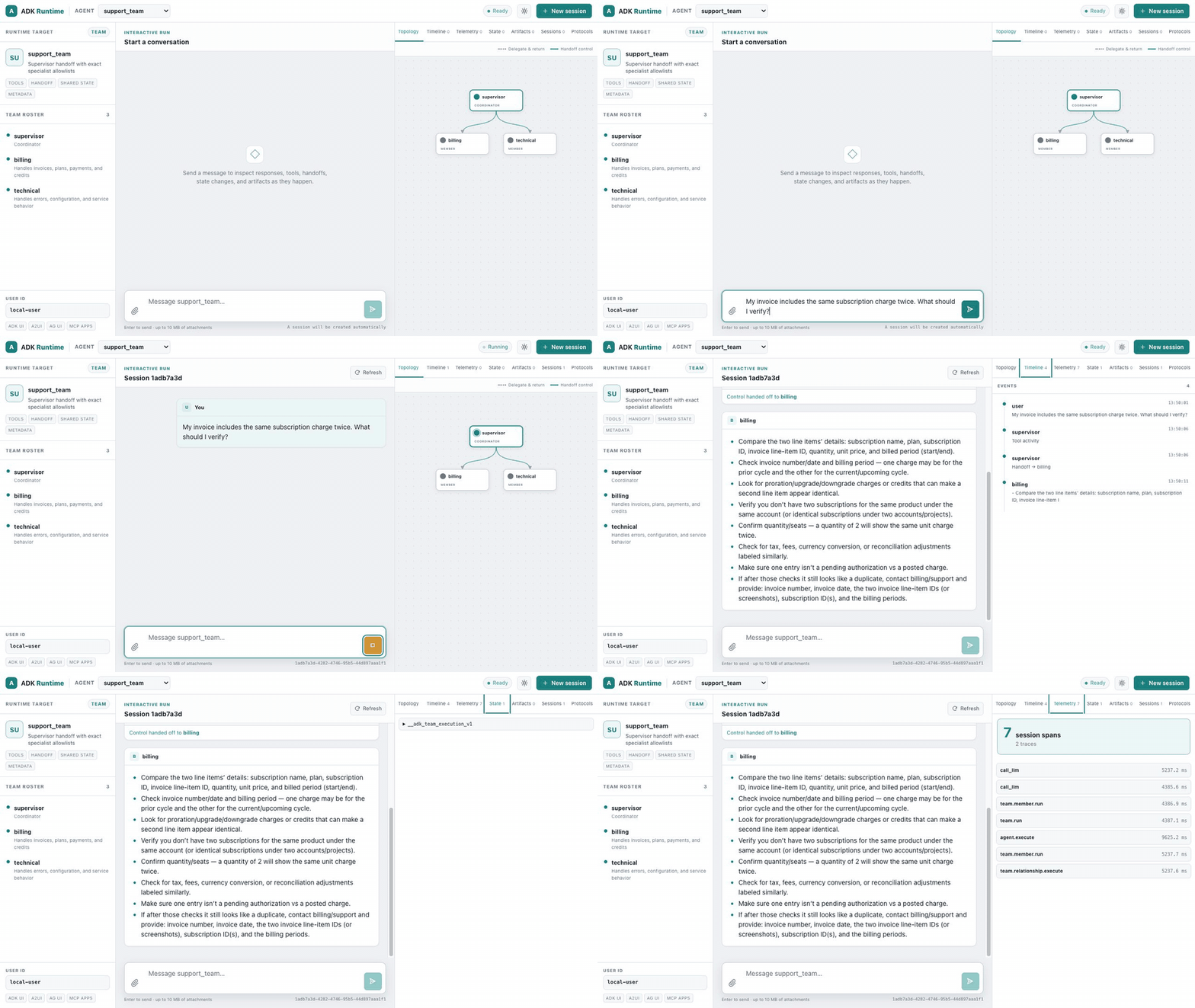
यह रिकॉर्डिंग पोर्टेबल-टीम शोकेस का उपयोग करती है, ताकि एनिमेटेड हैंडऑफ़ आसानी से दिखाई दे। आपके स्कैफ़ोल्ड किए गए एजेंट में वही रनटाइम UI और एक-नोड टोपोलॉजी होती है।
यदि आप स्मोक टेस्ट करना चाहते हैं, तो HTTP रनटाइम को अलग से सत्यापित करें:
curl -fsS http://127.0.0.1:8080/api/healthअब आपके पास एक ऐसा एक्ज़ीक्यूटेबल है जो एजेंट चलाता है, सत्र प्रबंधित करता है, इवेंट स्ट्रीम करता है और अपना परीक्षण इंटरफ़ेस प्रदान करता है। अलग फ्रंटएंड इंस्टॉल करने की आवश्यकता नहीं है।
क्या आप केवल टर्मिनल वाला एजेंट पसंद करते हैं?
इसके बजाय OpenAI कंसोल टेम्पलेट का उपयोग करें:
cargo adk new quickstart_console --template openai
cd quickstart_console
cp .env.example .env   # replace the OPENAI_API_KEY placeholder
cargo run
शून्य-कॉन्फ़िगरेशन विकल्प — adk::run()
यदि आप बिना स्कैफ़ोल्डिंग के बस एक त्वरित एजेंट चलाना चाहते हैं, तो यह वन-लाइनर उपयोग करें:
use adk_rust::run;

#[tokio::main]
async fn main() -> anyhow::Result<()> {
    dotenvy::dotenv().ok();
    // Minimal default: set GOOGLE_API_KEY. Add provider features for OpenAI/Anthropic.
    let response = run("You are a helpful assistant.", "Explain Rust in one sentence.").await?;
    println!("{response}");
    Ok(())
}
यह एक ही कॉल में प्रदाता का पता लगाने, सत्र बनाने, एजेंट तैयार करने और निष्पादन को संभालता है। यह स्क्रिप्ट, प्रोटोटाइप और त्वरित प्रयोगों के लिए उपयोगी है।
जनरेट किए गए कोड को समझना
API स्कैफ़ोल्ड का src/main.rs एक सामान्य LlmAgent बनाता है, फिर उसे
मानक सर्वर में माउंट करता है। महत्वपूर्ण कनेक्शन इस प्रकार है:
use adk_rust::prelude::*;
use adk_rust::server::{ServerConfig, create_app};
use adk_rust::session::InMemorySessionService;
use std::sync::Arc;

#[tokio::main]
async fn main() -> anyhow::Result<()> {
    dotenvy::dotenv().ok();
    let api_key = std::env::var("OPENAI_API_KEY")?;

    let model = adk_rust::model::openai::OpenAIClient::new(
        adk_rust::model::openai::OpenAIConfig::new(&api_key, "gpt-5.6-terra"),
    )?;

    let agent: Arc<dyn Agent> = Arc::new(
        LlmAgentBuilder::new("quickstart_agent")
            .description("REST API agent")
            .instruction("You are a helpful assistant accessible via REST API.")
            .model(Arc::new(model))
            .build()?,
    );

    let config = ServerConfig::new(
        Arc::new(adk_rust::SingleAgentLoader::new(agent)),
        Arc::new(InMemorySessionService::new()),
    );
    let app = create_app(config);

    let listener = tokio::net::TcpListener::bind("127.0.0.1:8080").await?;
    axum::serve(listener, app).await?;
    Ok(())
}| भाग | यह क्या करता है |
|---|---|
OpenAIClient | OPENAI_API_KEY से मॉडल क्लाइंट बनाता है |
LlmAgentBuilder | बिल्डर पैटर्न: नाम, विवरण, निर्देश (सिस्टम प्रॉम्प्ट), मॉडल, टूल |
InMemorySessionService | रनर और UI के लिए स्थानीय विकास सत्र संग्रहीत करता है |
create_app | REST/SSE API और एम्बेडेड रनटाइम UI को एक Axum राउटर में माउंट करता है |
कस्टम टूल जोड़ना
टूल जोड़ने का सबसे तेज़ तरीका #[tool] मैक्रो है। अपनी निर्भरताओं में adk-tool जोड़ें:
[dependencies]
adk-tool = "2.1.0"
schemars = "1"
serde = { version = "1", features = ["derive"] }
फिर एक टूल परिभाषित करें — डॉक टिप्पणी उसका विवरण बन जाती है, और args संरचना JSON स्कीमा बन जाती है:
use adk_tool::{tool, AdkError};
use schemars::JsonSchema;
use serde::Deserialize;
use serde_json::{json, Value};

#[derive(Deserialize, JsonSchema)]
struct WeatherArgs {
    /// The city to look up
    city: String,
}

/// Get the current weather for a city.
#[tool]
async fn get_weather(args: WeatherArgs) -> std::result::Result<Value, AdkError> {
    Ok(json!({ "temp": 22, "city": args.city, "condition": "sunny" }))
}
मैक्रो एक GetWeather संरचना उत्पन्न करता है जो Tool को कार्यान्वित करती है। इसे अपने एजेंट में जोड़ें:
let agent = LlmAgentBuilder::new("weather_agent")
    .instruction("Use the get_weather tool for weather questions.")
    .model(Arc::new(model))
    .tool(Arc::new(GetWeather))  // Generated by #[tool]
    .build()?;
सुझाव: या पहले से कॉन्फ़िगर किए गए टूल वाले प्रोजेक्ट का ढाँचा तैयार करें:
cargo adk new my-agent --template tools
अंतर्निहित टूल
ADK में उपयोग के लिए तैयार टूल भी शामिल हैं:
// Google Search (handled server-side by Gemini)
.tool(Arc::new(GoogleSearchTool::new()))

// Exit a LoopAgent
.tool(Arc::new(ExitLoopTool::new()))
वेब सर्वर के रूप में चलाना
जब आप HTTP सर्विंग चाहते हों, तब सर्वर प्रोजेक्ट का ढाँचा तैयार करें:
cargo adk new my-api --template api --provider openai
cd my-api
cp .env.example .env
cargo run
http://127.0.0.1:8080/ui/ खोलें। डिफ़ॉल्ट मूल टेम्पलेट इसके बजाय
हल्के कंसोल लॉन्चर का उपयोग करता है।
अन्य मॉडल का उपयोग करना
फ़ीचर फ़्लैग के माध्यम से प्रदाताओं को सक्षम करें। तेज़ इंस्टॉलेशन के लिए डिफ़ॉल्ट बिल्ड केवल Gemini का रहता है, इसलिए केवल आवश्यक प्रदाता जोड़ें:
[dependencies]
adk-rust = { version = "2.1.0", features = ["openai"] }
या किसी प्रदाता के साथ ढाँचा तैयार करें: cargo adk new my-agent --provider openai
OpenAI
let api_key = std::env::var("OPENAI_API_KEY")?;
let model = OpenAIClient::new(OpenAIConfig::new(api_key, "gpt-5.6-terra"))?;
Anthropic
let api_key = std::env::var("ANTHROPIC_API_KEY")?;
let model = AnthropicClient::new(AnthropicConfig::new(api_key, "claude-sonnet-5"))?;
DeepSeek
let api_key = std::env::var("DEEPSEEK_API_KEY")?;
let model = DeepSeekClient::chat(api_key)?;         // standard
// let model = DeepSeekClient::reasoner(api_key)?;   // chain-of-thought
Groq
let api_key = std::env::var("GROQ_API_KEY")?;
let model = GroqClient::new(GroqConfig::gpt_oss_120b(api_key))?;
Ollama (स्थानीय)
// Requires: ollama serve && ollama pull llama3.2
let model = OllamaModel::new(OllamaConfig::new("llama3.2"))?;
समर्थित मॉडल
| प्रदाता | मॉडल उदाहरण | फ़ीचर फ़्लैग |
|---|---|---|
| Gemini | gemini-3.7-flash, gemini-3.6-flash, gemini-3.1-pro-preview | (डिफ़ॉल्ट) |
| OpenAI | gpt-5.6-terra, gpt-5.6-sol, gpt-5.6-luna | openai |
| Anthropic | claude-sonnet-5, claude-opus-5, claude-fable-5 | anthropic |
| DeepSeek | deepseek-v4-flash, deepseek-v4-pro | deepseek |
| Groq | openai/gpt-oss-120b, openai/gpt-oss-20b | groq |
| Ollama | qwen3.6:35b-a3b, qwen3.5, llama3.2:3b | ollama |
अगले चरण
- LlmAgent कॉन्फ़िगरेशन — सभी कॉन्फ़िगरेशन विकल्प
- फ़ंक्शन टूल —
#[tool]के साथ कस्टम टूल बनाएँ - वर्कफ़्लो एजेंट — क्रमिक, समानांतर, लूप पाइपलाइन
- सेशन — वार्तालाप स्थिति प्रबंधित करें
- कॉलबैक — एजेंट के व्यवहार को अनुकूलित करें