서버 API
ADK-Rust 서버는 에이전트를 실행하고 세션을 관리하며 아티팩트에 액세스하기 위한 REST API을 제공합니다. 서버 모드에서 Launcher를 사용하여 에이전트를 배포하면 이러한 엔드포인트와 웹 UI가 노출됩니다.
개요
서버는 Axum을 기반으로 구축되었으며 다음을 제공합니다.
- REST API: 에이전트 실행 및 세션 관리를 위한 HTTP 엔드포인트
- 서버 전송 이벤트(SSE): 에이전트 응답의 실시간 스트리밍
- 웹 UI: 브라우저 기반 대화형 인터페이스
- CORS 지원: 교차 출처 요청 활성화
- 텔레메트리: tracing을 통한 기본 제공 관측 가능성
ServerConfig은 장시간 실행되는 배포를 위해 러너 수준의 패스스루도 제공합니다.
let config = ServerConfig::new(agent_loader, session_service)
    .with_compaction(compaction_config)
    .with_context_cache(context_cache_config, cache_capable_model);
서버 시작
Launcher를 사용하여 서버를 시작합니다.
use adk_rust::prelude::*;
use adk_rust::Launcher;
use std::sync::Arc;

#[tokio::main]
async fn main() -> Result<()> {
    let api_key = std::env::var("GOOGLE_API_KEY")?;
    let model = Arc::new(GeminiModel::new(&api_key, "gemini-3.7-flash")?);

    let agent = LlmAgentBuilder::new("my_agent")
        .description("A helpful assistant")
        .instruction("You are a helpful assistant.")
        .model(model)
        .build()?;

    Launcher::new(Arc::new(agent)).run().await
}
검증된 API 스캐폴드에서 시작합니다.
cargo adk new my-api --template api
cd my-api
cargo run
REST API 엔드포인트
상태 확인
서버가 실행 중인지 확인합니다.
GET /api/health응답:
OK스트리밍을 사용하여 에이전트 실행
서버 전송 이벤트를 사용하여 에이전트를 실행하고 응답을 스트리밍합니다.
POST /api/run_sse요청 본문:
{
  "appName": "my_agent",
  "userId": "user123",
  "sessionId": "session456",
  "newMessage": {
    "role": "user",
    "parts": [
      {
        "text": "What is the capital of France?"
      }
    ]
  },
  "streaming": true
}
응답:
- Content-Type:
text/event-stream - 이벤트를 JSON 객체로 스트리밍
이벤트 형식:
{
  "id": "evt_123",
  "timestamp": 1234567890,
  "author": "my_agent",
  "content": {
    "role": "model",
    "parts": [
      {
        "text": "The capital of France is Paris."
      }
    ]
  },
  "actions": {},
  "llm_response": {
    "content": {
      "role": "model",
      "parts": [
        {
          "text": "The capital of France is Paris."
        }
      ]
    }
  }
}
에이전트 실행(스트리밍 없음)
에이전트를 완료될 때까지 실행하고 모든 이벤트를 단일 JSON 응답으로 수신합니다.
POST /api/run요청 본문: POST /api/run_sse와 동일한 형식(streaming 필드는 무시됨):
{
  "appName": "my_agent",
  "userId": "user123",
  "sessionId": "session456",
  "newMessage": {
    "role": "user",
    "parts": [
      {
        "text": "What is the capital of France?"
      }
    ]
  }
}
응답:
- Content-Type:
application/json - 실행 중 생성된 모든 이벤트를 순서대로 포함하는 JSON 배열이며,
/api/run_sse과 동일한 이벤트 형식을 사용합니다.
이 엔드포인트는 Google ADK의 api_server 비스트리밍 /run 라우트를 그대로 반영합니다.
세션 관리
세션 생성
새 세션 생성:
POST /api/sessions요청 본문:
{
  "appName": "my_agent",
  "userId": "user123",
  "sessionId": "session456"
}
응답:
{
  "id": "session456",
  "appName": "my_agent",
  "userId": "user123",
  "lastUpdateTime": 1234567890,
  "events": [],
  "state": {}
}
세션 가져오기
세션 세부 정보 검색:
GET /api/sessions/:app_name/:user_id/:session_id응답:
{
  "id": "session456",
  "appName": "my_agent",
  "userId": "user123",
  "lastUpdateTime": 1234567890,
  "events": [],
  "state": {}
}
세션 삭제
세션 삭제:
DELETE /api/sessions/:app_name/:user_id/:session_id응답:
- 상태:
204 No Content
세션 목록
사용자의 모든 세션 나열:
GET /api/apps/:app_name/users/:user_id/sessions응답:
[
  {
    "id": "session456",
    "appName": "my_agent",
    "userId": "user123",
    "lastUpdateTime": 1234567890,
    "events": [],
    "state": {}
  }
]
아티팩트 관리
아티팩트 목록
세션의 모든 아티팩트 나열:
GET /api/sessions/:app_name/:user_id/:session_id/artifacts응답:
[
  "image1.png",
  "document.pdf",
  "data.json"
]
아티팩트 가져오기
아티팩트 다운로드:
GET /api/sessions/:app_name/:user_id/:session_id/artifacts/:artifact_name응답:
- Content-Type: 파일 확장자에 따라 결정됨
- 본문: 바이너리 또는 텍스트 콘텐츠
애플리케이션 관리
애플리케이션 목록
사용 가능한 모든 에이전트 나열:
GET /api/apps
GET /api/list-apps  (legacy compatibility)
응답:
{
  "apps": [
    {
      "name": "my_agent",
      "description": "A helpful assistant"
    }
  ]
}
웹 UI
서버에는 다음 주소에서 액세스할 수 있는 기본 제공 웹 UI가 포함되어 있습니다.
http://localhost:8080/ui/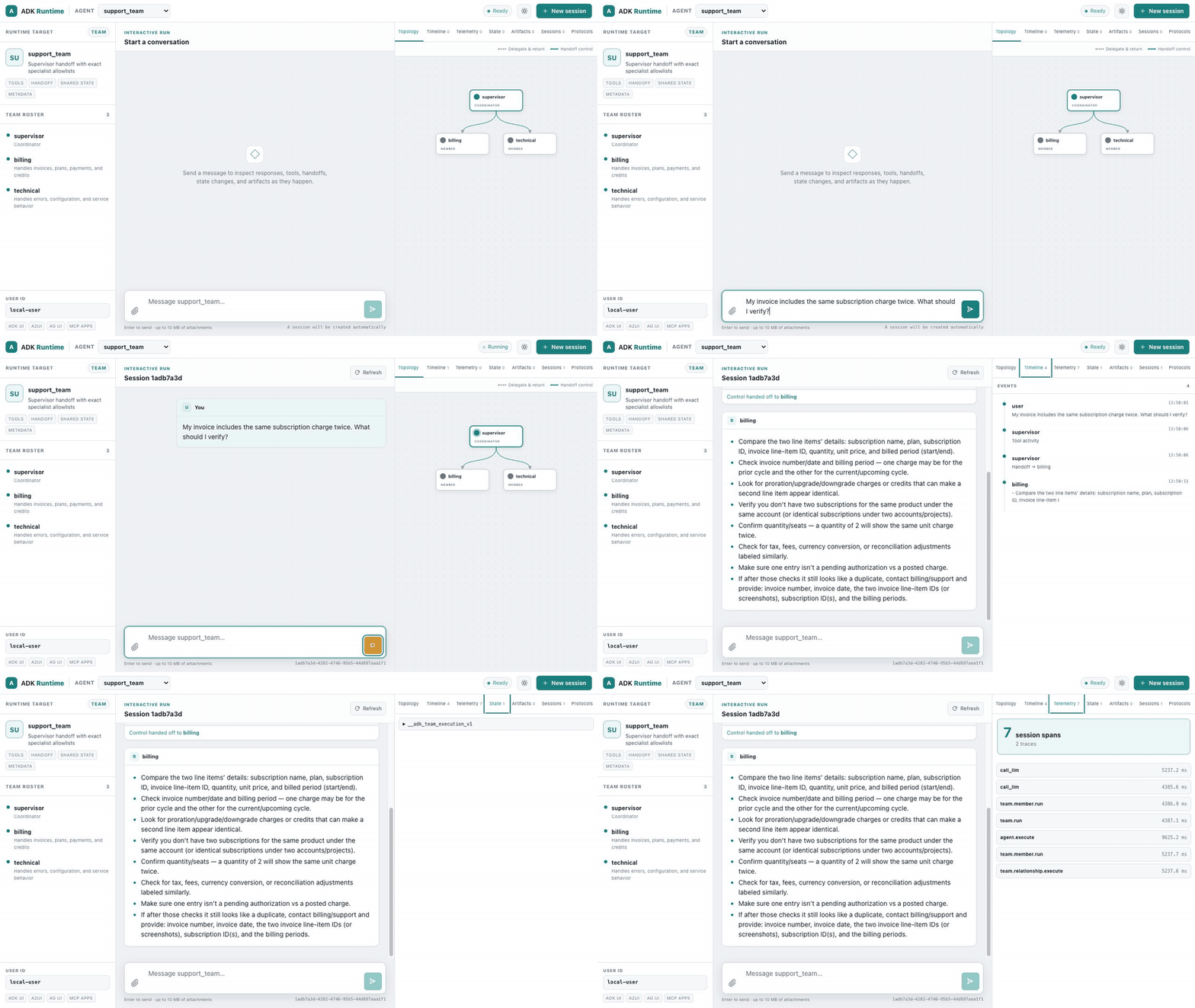
5분 빠른 시작은 OpenAI 기반 서버를 스캐폴딩하고 네 개의 명령으로 이 인터페이스를 엽니다. 녹화에서는 팀을 사용하여 활성 토폴로지 에지를 표시합니다. 리프 에이전트, 도구, 그래프, 워크플로, 실시간 에이전트 및 원격 에이전트도 동일한 인터페이스를 사용합니다.
기능
- 대화형 실행: 메시지와 첨부 파일을 보내고, 안전하게 렌더링된 Markdown, 스트리밍 텍스트, 도구 호출, 실패 및 핸드오프를 검사
- 세션 관리: 세션을 생성하고 확인하며 세션 간 전환
- 이식 가능한 팀 토폴로지: 정확한 위임 및 반환 엣지와 제어 핸드오프를 구분하고, 활성 멤버와 들어오는 엣지에 Studio Next 스타일 애니메이션 적용
- 런타임 검사기: 순서가 지정된 이벤트, 전용 텔레메트리 스팬, 공유/세션 상태, 구성된 런타임 서비스, A2A 검색, UI/MCP Apps 프로토콜 지원을 검사
- 실시간 재생: 실시간 에이전트를 인식하고, 트랜스크립트 델타를 병합하며, 완료된 PCM 출력을 WAV 오디오로 재생
- 아티팩트 뷰어: 세션 아티팩트를 확인하고 다운로드
- 반응형 테마: 외부 에셋 없이 키보드로 접근 가능한 시스템, 라이트 및 다크 레이아웃
UI 경로
/-/ui/(으)로 리디렉션/ui/- 기본 채팅 인터페이스/ui/assets/*- 정적 에셋(CSS, JS, 이미지)/ui/assets/config/runtime-config.json- 런타임 구성/api/ui/agents/{name}- 에이전트 기능, 계층 구조 및 이식 가능한 토폴로지 메타데이터
인터페이스는 adk-server/webui에서 유지 관리되며 프로덕션 빌드는
서버 크레이트에 포함되므로, 생성된 프로젝트와 배포에서는 별도의
프론트엔드 서비스 없이 동일한 런타임 UI를 사용합니다.
실행 가능한 runtime UI 쇼케이스에는 도구 호출
에이전트, 결정론적 그래프 워크플로, 이식 가능한 핸드오프 팀을 위한 별도의
OpenAI 기반 안내와 스크린샷이 포함되어 있습니다. 고급 에이전트 갤러리에는
앰비언트 일정, OpenAI Realtime 음성 재생, A2A 검색, SEP-2663 작업이 포함된
MCP 2026-07-28 검색, 그리고 하나의 서버에서 구성된 텔레메트리, 아티팩트 및
메모리 서비스가 추가됩니다. ADK Runtime 브랜드는 새 탭에서
adk-rust.com으로 연결됩니다.
클라이언트 예제
JavaScript/TypeScript
Fetch API를 SSE과 함께 사용:
async function runAgent(message) {
  const response = await fetch('http://localhost:8080/api/run_sse', {
    method: 'POST',
    headers: {
      'Content-Type': 'application/json',
    },
    body: JSON.stringify({
      appName: 'my_agent',
      userId: 'user123',
      sessionId: 'session456',
      newMessage: {
        role: 'user',
        parts: [{ text: message }]
      },
      streaming: true
    })
  });

  const reader = response.body.getReader();
  const decoder = new TextDecoder();

  while (true) {
    const { done, value } = await reader.read();
    if (done) break;

    const chunk = decoder.decode(value);
    const lines = chunk.split('\n');

    for (const line of lines) {
      if (line.startsWith('data: ')) {
        const event = JSON.parse(line.slice(6));
        console.log('Event:', event);
      }
    }
  }
}
Python
requests 라이브러리 사용:
import requests
import json

def run_agent(message):
    url = 'http://localhost:8080/api/run_sse'
    payload = {
        'appName': 'my_agent',
        'userId': 'user123',
        'sessionId': 'session456',
        'newMessage': {
            'role': 'user',
            'parts': [{'text': message}]
        },
        'streaming': True
    }

    response = requests.post(url, json=payload, stream=True)

    for line in response.iter_lines():
        if line:
            line_str = line.decode('utf-8')
            if line_str.startswith('data: '):
                event = json.loads(line_str[6:])
                print('Event:', event)

run_agent('What is the capital of France?')
cURL
# Create session
curl -X POST http://localhost:8080/api/sessions \
  -H "Content-Type: application/json" \
  -d '{
    "appName": "my_agent",
    "userId": "user123",
    "sessionId": "session456"
  }'

# Run agent with streaming
curl -X POST http://localhost:8080/api/run_sse \
  -H "Content-Type: application/json" \
  -d '{
    "appName": "my_agent",
    "userId": "user123",
    "sessionId": "session456",
    "newMessage": {
      "role": "user",
      "parts": [{"text": "What is the capital of France?"}]
    },
    "streaming": true
  }'
서버 구성
사용자 지정 포트
사용자 지정 포트를 사용하려면 생성된 서버를 시작하기 전에 PORT을 설정합니다.
PORT=3000 cargo run사용자 지정 아티팩트 서비스
자체 아티팩트 서비스를 제공합니다.
use adk_artifact::InMemoryArtifactService;

let artifact_service = Arc::new(InMemoryArtifactService::new());

Launcher::new(Arc::new(agent))
    .with_artifact_service(artifact_service)
    .run()
    .await
사용자 지정 세션 서비스
프로덕션 배포에서는 영구 세션 서비스를 사용합니다.
use adk_session::SqliteSessionService;

// Note: This requires implementing a custom server setup
// The Launcher uses InMemorySessionService by default
오류 처리
API는 오류 범주에서 파생된 HTTP 상태 코드를 사용하는 구조화된 오류 응답을 제공합니다.
| 상태 코드 | 범주 | 의미 |
|---|---|---|
| 200 | — | 성공 |
| 204 | — | 성공 (콘텐츠 없음) |
| 400 | invalid_input | 잘못된 요청 — 매개변수 또는 구성이 유효하지 않음 |
| 401 | unauthorized | 자격 증명이 없거나 유효하지 않음 |
| 403 | forbidden | 유효한 자격 증명이지만 권한이 부족함 |
| 404 | not_found | 리소스를 찾을 수 없음 |
| 408 | timeout | 작업 시간이 초과되었습니다 |
| 429 | rate_limited | 업스트림 속도 제한을 초과했습니다 |
| 500 | internal | 내부 서버 오류 |
| 501 | unsupported | 기능이 지원되지 않습니다 |
| 503 | unavailable | 업스트림 서비스를 사용할 수 없음 |
오류 응답 형식(Problem JSON):
{
  "error": {
    "code": "model.openai.rate_limited",
    "message": "OpenAI rate limit exceeded",
    "component": "model",
    "category": "rate_limited",
    "requestId": "req-abc123",
    "retryAfter": 5000,
    "upstreamStatusCode": 429
  }
}
사용 가능한 경우 requestId, retryAfter 및 upstreamStatusCode 필드가 포함됩니다(그렇지 않으면 null).
CORS 구성
서버는 기본적으로 허용적인 CORS을 활성화하여 모든 오리진의 요청을 허용합니다. 이는 개발 환경에 적합하지만 프로덕션에서는 제한해야 합니다.
텔레메트리
서버가 시작되면 텔레메트리를 자동으로 초기화합니다. 로그는 구조화된 형식으로 stdout에 출력됩니다.
로그 수준:
ERROR: 치명적 오류WARN: 경고INFO: 일반 정보(기본값)DEBUG: 자세한 디버깅 정보TRACE: 매우 자세한 추적 정보
RUST_LOG 환경 변수로 로그 수준을 설정합니다.
RUST_LOG=debug cargo run모범 사례
- 세션 관리: 에이전트를 실행하기 전에 항상 세션을 생성합니다
- 오류 처리: HTTP 상태 코드를 확인하고 오류를 적절히 처리합니다
- 스트리밍: 실시간 응답에는 SSE를 사용하고 이벤트를 한 줄씩 구문 분석합니다
- 보안: 프로덕션에서는 인증을 구현하고 CORS을 제한합니다
- 영속성: 프로덕션 배포에는
SqliteSessionService또는PostgresSessionService을 사용합니다 - 모니터링: 텔레메트리를 활성화하고 문제 발생 여부를 확인하기 위해 로그를 모니터링합니다
풀스택 예제
완전하게 작동하는 서버 스캐폴드를 사용하려면 검증된 cargo-adk API 템플릿을 사용합니다. 다음을 보여 줍니다.
- 프론트엔드: 실시간 스트리밍을 지원하는 HTML/JavaScript 클라이언트
- 백엔드: 사용자 지정 research 및 PDF generation 도구를 사용하는 ADK 에이전트
- 통합: SSE 스트리밍을 사용하는 완전한 REST API 사용
- 아티팩트: PDF 생성 및 다운로드
- 세션 관리: 자동 세션 생성 및 처리
이 예제는 ADK-Rust을 사용하여 AI 기반 웹 애플리케이션을 구축하기 위한 프로덕션 수준의 패턴을 보여줍니다.
빠른 시작:
cargo adk new my-api --template api
cd my-api
cargo run
파일:
- 백엔드:
adk-rust-guide/examples/deployment/full_stack_research.rs - 프런트엔드:
examples/research_paper/frontend.html - 문서:
examples/research_paper/README.md - 아키텍처:
examples/research_paper/architecture.md
관련 항목
이전: ← 런처 | 다음: A2A 프로토콜 →