No hardcoded logic — classification rules and KB articles are added at runtime via tools.
← MCP server registry
Business operationsPublic source
ITSM MCP Server
Intelligent IT Service Management for ADK-Rust Enterprise agents. 25 MCP tools with agentic workflows — auto-classifies tickets, resolves from knowledge base, detects duplicates, and routes intelligently. No hardcoded…
What it gives an agent
A purpose-built capability behind one MCP connection.
The server owns its domain logic and publishes a tool contract an MCP client can discover. ADK-Rust can load that contract into an agent, normalize each schema for the chosen model provider, and keep the connection lifecycle outside the agent’s business logic.
KB-first resolution — searches knowledge base before creating tickets. Grows smarter over time.
TF-IDF scoring — relevance-ranked KB search (pluggable for adk-rag semantic search).
Duplicate detection — 30% word-overlap threshold against all non-closed tickets.
Priority escalation — urgency keywords ("outage", "all users", "critical") auto-escalate regardless of rule defaults.
Full audit trace — every agentic decision is traced and returned.
Architecture
How ITSM MCP Server fits into an agent system.
The model never needs the implementation details or credentials of the system behind the server. It sees reviewed tool definitions. The MCP client handles discovery and calls, while the server keeps ownership of validation, policy, and communication with its domain system.
01
ADK-Rust agent
Chooses a capability from the reviewed tool catalog.
02
MCP client
Discovers schemas, sends calls, and receives typed content.
03
ITSM MCP Server
Validates the request and owns 25 documented tool contracts.
04
Domain system
Keeps the API, data, credentials, and business rules behind the server.
From the project documentation
The server’s published architecture
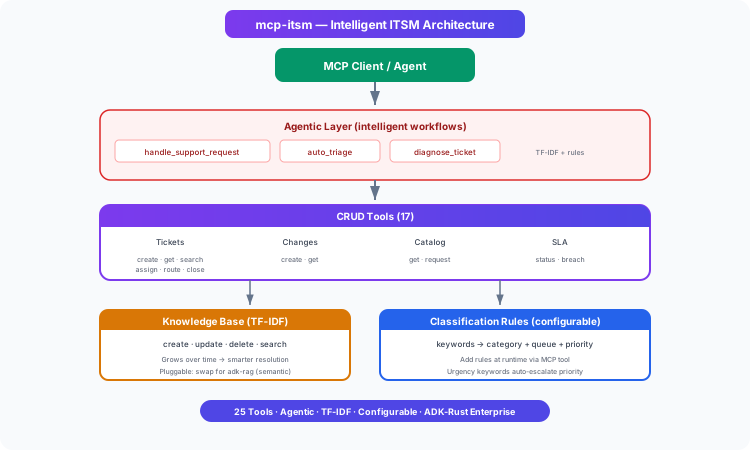
Tool catalog
What can an agent ask ITSM MCP Server to do?
Each tool has a stable name, a human-readable purpose, and a JSON input contract discovered during MCP initialization. Risk classes come from the project’s registry manifest when one is available.
12 named tools shown from 25 documented tools
create_ticketCreate an incident, service request, or task ticket
internal writeget_ticketGet full ticket details including status, assignee, SLA, notes
read onlysearch_ticketsSearch tickets by keyword, status, assignee, or queue
read onlyupdate_ticketUpdate ticket priority, category, or service fields
internal writetransition_ticketMove ticket through valid workflow states
internal writeassign_ticketAssign ticket to a user or team
internal writeroute_ticketMove ticket to a different queue/team
internal writeclose_ticketClose ticket with resolution code, notes, and evidence
internal writeget_slaGet SLA deadlines, breach state, and time remaining
read onlyopen_change_requestOpen a change request with risk, impact, and rollback plan
internal writesearch_knowledgeSearch knowledge base articles using TF-IDF scoring
read onlyhandle_support_requestHandle a support request end-to-end: classify, deduplicate, search KB, auto-resolve or create ticket
internal writeGovernance
Understand the effect of every tool.
A server connection inherits the authority of its credentials and deployment environment. The declarations below come from this project’s README and MCP registry manifest; your application still decides which tools an agent receives and where approval is required.
8 internal write4 read only
- Full audit trace — every agentic decision is traced and returned.
MCP surface
What the current documentation declares.
MCP can carry tools, resources, prompts, structured results, progress, cancellation, and long-running work. This record highlights the modern protocol features explicitly mentioned by this repository.
The current README concentrates on its tool surface. Check the source and release notes before relying on optional MCP capabilities beyond tool discovery and invocation.
ADK MCP SDKrmcpRegistry manifest
Install and connect
Follow the project’s documented starting point.
Install the server in the environment that owns its credentials and domain access. Add it to your MCP host, verify the discovered tools, and narrow the toolset before giving it to a production agent.
Install
cargo install mcp-itsmMCP client configuration
> add_classification_rule(keywords: ["vpn","network","dns"], category: "Network", queue: "Network Team", default_priority: "high")
> add_classification_rule(keywords: ["password","login","access"], category: "Access", queue: "Identity Team", default_priority: "medium")
> create_kb_article(title: "VPN troubleshooting", body: "1. Restart client 2. Try alternate server", category: "Network", tags: ["vpn","timeout"])
Commands and configuration are extracted from the public README. Confirm prerequisites, environment variables, and release-specific options in the official documentation before deployment.
Official documentation
Continue with the project maintainers’ source of truth.
This page provides an approachable map of the server. The repository remains authoritative for exact schemas, prerequisites, configuration, examples, tests, releases, and security updates.
Keep exploring
More in business operations.
Ads MCP ServerA digital advertising platform for ADK-Rust Enterprise sales & marketing agents. 19 MCP tools covering campaigns, ad groups, ads/creatives, budgets and bids, audiences, daily performance metrics with derived KPIs…19 toolsAnalytics MCP ServerGoverned analytics platform for AI agents — metrics, dashboards, funnels, cohorts, anomaly detection, forecasting, and policy enforcement. 28 tools with full audit trail.28 toolsBanking MCP ServerUnified banking MCP server with 15 tools across 3 backends — Plaid (US/Canada/EU), Mono (Africa), and Open Banking (UK/EU PSD2). Accounts, transactions, balances, payments, identity, and statements.15 tools
Source record
Release and repository metadata for this catalog entry.
- Version
- 1.1.0
- License
- Apache-2.0
- Tools
- 25
- Revision
- 70103e49d9c6
- Updated
- May 24, 2026
Transportsstdio