服务器 API
ADK-Rust 服务器提供了一个用于运行代理、管理会话和访问构件的 REST API。当你在服务器模式下使用 Launcher 部署代理时,它会公开这些端点以及 Web UI。
概述
该服务器基于 Axum 构建,并提供:
- REST API:用于代理执行和会话管理的 HTTP 端点
- 服务器发送事件(SSE):实时流式传输代理响应
- Web UI:基于浏览器的交互式界面
- CORS 支持:启用跨源请求
- 遥测:通过 tracing 提供内置的可观测性
ServerConfig 还为长时间运行的部署公开运行器级直通功能:
let config = ServerConfig::new(agent_loader, session_service)
    .with_compaction(compaction_config)
    .with_context_cache(context_cache_config, cache_capable_model);
启动服务器
使用 Launcher 启动服务器:
use adk_rust::prelude::*;
use adk_rust::Launcher;
use std::sync::Arc;

#[tokio::main]
async fn main() -> Result<()> {
    let api_key = std::env::var("GOOGLE_API_KEY")?;
    let model = Arc::new(GeminiModel::new(&api_key, "gemini-3.7-flash")?);

    let agent = LlmAgentBuilder::new("my_agent")
        .description("A helpful assistant")
        .instruction("You are a helpful assistant.")
        .model(model)
        .build()?;

    Launcher::new(Arc::new(agent)).run().await
}
从经过验证的 API 脚手架开始:
cargo adk new my-api --template api
cd my-api
cargo run
REST API 端点
健康检查
检查服务器是否正在运行:
GET /api/health响应:
OK运行代理并进行流式传输
执行代理,并使用服务器发送事件流式传输响应:
POST /api/run_sse请求正文:
{
  "appName": "my_agent",
  "userId": "user123",
  "sessionId": "session456",
  "newMessage": {
    "role": "user",
    "parts": [
      {
        "text": "What is the capital of France?"
      }
    ]
  },
  "streaming": true
}
响应:
- Content-Type:
text/event-stream - 将事件作为 JSON 对象进行流式传输
事件格式:
{
  "id": "evt_123",
  "timestamp": 1234567890,
  "author": "my_agent",
  "content": {
    "role": "model",
    "parts": [
      {
        "text": "The capital of France is Paris."
      }
    ]
  },
  "actions": {},
  "llm_response": {
    "content": {
      "role": "model",
      "parts": [
        {
          "text": "The capital of France is Paris."
        }
      ]
    }
  }
}
运行代理(非流式)
执行代理直至完成,并在单个 JSON 响应中接收所有事件:
POST /api/run**请求正文:**形状与 POST /api/run_sse 相同(streaming 字段会被忽略):
{
  "appName": "my_agent",
  "userId": "user123",
  "sessionId": "session456",
  "newMessage": {
    "role": "user",
    "parts": [
      {
        "text": "What is the capital of France?"
      }
    ]
  }
}
响应:
- Content-Type:
application/json - 一个 JSON 数组,按顺序包含运行过程中产生的每个事件,使用与
/api/run_sse相同的事件格式
此端点对应 Google ADK 的 api_server 非流式 /run 路由。
会话管理
创建会话
创建新会话:
POST /api/sessions请求正文:
{
  "appName": "my_agent",
  "userId": "user123",
  "sessionId": "session456"
}
响应:
{
  "id": "session456",
  "appName": "my_agent",
  "userId": "user123",
  "lastUpdateTime": 1234567890,
  "events": [],
  "state": {}
}
获取会话
获取会话详细信息:
GET /api/sessions/:app_name/:user_id/:session_id响应:
{
  "id": "session456",
  "appName": "my_agent",
  "userId": "user123",
  "lastUpdateTime": 1234567890,
  "events": [],
  "state": {}
}
删除会话
删除会话:
DELETE /api/sessions/:app_name/:user_id/:session_id响应:
- 状态:
204 No Content
列出会话
列出用户的所有会话:
GET /api/apps/:app_name/users/:user_id/sessions响应:
[
  {
    "id": "session456",
    "appName": "my_agent",
    "userId": "user123",
    "lastUpdateTime": 1234567890,
    "events": [],
    "state": {}
  }
]
工件管理
列出工件
列出会话的所有工件:
GET /api/sessions/:app_name/:user_id/:session_id/artifacts响应:
[
  "image1.png",
  "document.pdf",
  "data.json"
]
获取工件
下载工件:
GET /api/sessions/:app_name/:user_id/:session_id/artifacts/:artifact_name响应:
- Content-Type:由文件扩展名决定
- 正文:二进制或文本内容
应用管理
列出应用
列出所有可用的代理:
GET /api/apps
GET /api/list-apps  (legacy compatibility)
响应:
{
  "apps": [
    {
      "name": "my_agent",
      "description": "A helpful assistant"
    }
  ]
}
Web UI
服务器包含一个内置 Web UI,可通过以下地址访问:
http://localhost:8080/ui/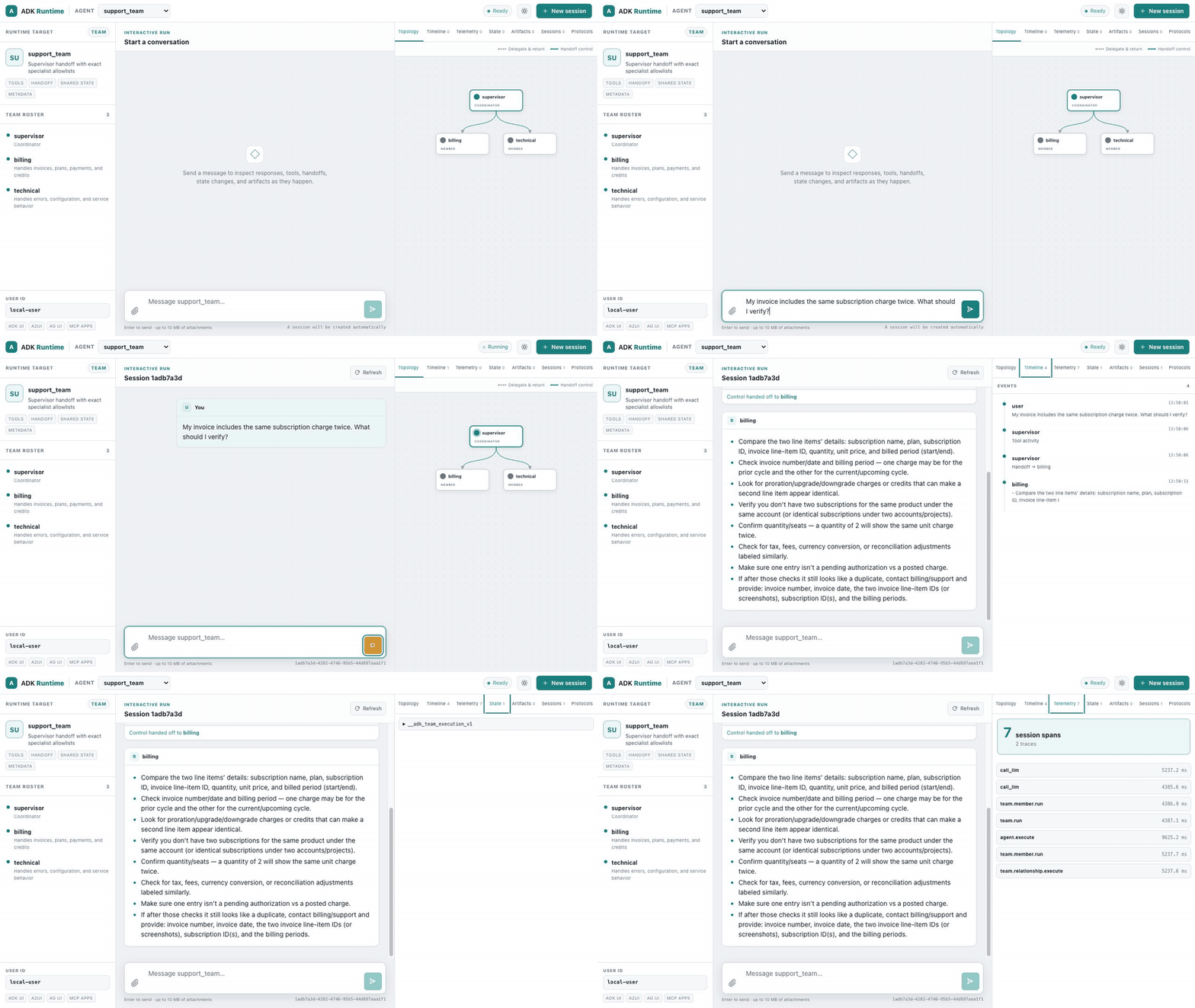
五分钟快速入门使用 OpenAI 构建服务器, 并通过四条命令打开此界面。录制内容使用团队来显示活动拓扑边;叶代理、工具、图、工作流、 实时代理和远程代理使用相同的界面。
功能
- 交互式运行:发送消息和附件,并安全地查看渲染后的 Markdown、流式文本、工具调用、失败和交接
- 会话管理:创建、查看和切换会话
- 可移植的团队拓扑:区分精确的委派与返回边和控制交接,并为活动成员及传入边提供类似 Studio Next 的动画
- 运行时检查器:检查有序事件、专用遥测跨度、共享/会话状态、已配置的运行时服务、A2A 发现,以及 UI/MCP Apps 协议支持
- 实时回放:识别实时 agent,合并转录增量,并将完成的 PCM 输出作为 WAV 音频播放
- 工件查看器:查看和下载会话工件
- 响应式主题:支持键盘访问的系统、浅色和深色布局,且不使用外部资源
UI 路由
/- 重定向到/ui//ui/- 主聊天界面/ui/assets/*- 静态资源(CSS、JS、图像)/ui/assets/config/runtime-config.json- 运行时配置/api/ui/agents/{name}- agent 能力、层级结构和可移植拓扑元数据
该界面维护在 adk-server/webui 中,其生产构建版本嵌入服务器 crate,因此生成的项目和部署使用相同的运行时 UI,无需单独的前端服务。
可运行的 运行时 UI 展示
包含由 OpenAI 支持的独立演示和截图,涵盖工具调用
agent、确定性图工作流和可移植的交接团队。高级 agent 展示还增加了
环境调度、OpenAI Realtime 语音播放、A2A 发现、MCP
2026-07-28 发现(包含 SEP-2663 任务),以及在同一服务器中配置的遥测、工件
和记忆服务。ADK Runtime 品牌会在新标签页中链接到
adk-rust.com。
客户端示例
JavaScript/TypeScript
使用 Fetch API 和 SSE:
async function runAgent(message) {
  const response = await fetch('http://localhost:8080/api/run_sse', {
    method: 'POST',
    headers: {
      'Content-Type': 'application/json',
    },
    body: JSON.stringify({
      appName: 'my_agent',
      userId: 'user123',
      sessionId: 'session456',
      newMessage: {
        role: 'user',
        parts: [{ text: message }]
      },
      streaming: true
    })
  });

  const reader = response.body.getReader();
  const decoder = new TextDecoder();

  while (true) {
    const { done, value } = await reader.read();
    if (done) break;

    const chunk = decoder.decode(value);
    const lines = chunk.split('\n');

    for (const line of lines) {
      if (line.startsWith('data: ')) {
        const event = JSON.parse(line.slice(6));
        console.log('Event:', event);
      }
    }
  }
}
Python
使用 requests 库:
import requests
import json

def run_agent(message):
    url = 'http://localhost:8080/api/run_sse'
    payload = {
        'appName': 'my_agent',
        'userId': 'user123',
        'sessionId': 'session456',
        'newMessage': {
            'role': 'user',
            'parts': [{'text': message}]
        },
        'streaming': True
    }

    response = requests.post(url, json=payload, stream=True)

    for line in response.iter_lines():
        if line:
            line_str = line.decode('utf-8')
            if line_str.startswith('data: '):
                event = json.loads(line_str[6:])
                print('Event:', event)

run_agent('What is the capital of France?')
cURL
# Create session
curl -X POST http://localhost:8080/api/sessions \
  -H "Content-Type: application/json" \
  -d '{
    "appName": "my_agent",
    "userId": "user123",
    "sessionId": "session456"
  }'

# Run agent with streaming
curl -X POST http://localhost:8080/api/run_sse \
  -H "Content-Type: application/json" \
  -d '{
    "appName": "my_agent",
    "userId": "user123",
    "sessionId": "session456",
    "newMessage": {
      "role": "user",
      "parts": [{"text": "What is the capital of France?"}]
    },
    "streaming": true
  }'
服务器配置
自定义端口
若要使用自定义端口,请在启动生成的服务器之前设置 PORT:
PORT=3000 cargo run自定义工件服务
提供您自己的工件服务:
use adk_artifact::InMemoryArtifactService;

let artifact_service = Arc::new(InMemoryArtifactService::new());

Launcher::new(Arc::new(agent))
    .with_artifact_service(artifact_service)
    .run()
    .await
自定义会话服务
对于生产部署,请使用持久化会话服务:
use adk_session::SqliteSessionService;

// Note: This requires implementing a custom server setup
// The Launcher uses InMemorySessionService by default
错误处理
API 使用结构化错误响应,并根据错误类别返回由 HTTP 派生的状态码:
| 状态码 | 类别 | 含义 |
|---|---|---|
| 200 | — | 成功 |
| 204 | — | 成功(无内容) |
| 400 | invalid_input | 错误请求 — 参数或配置无效 |
| 401 | unauthorized | 缺少凭据或凭据无效 |
| 403 | forbidden | 凭据有效,但权限不足 |
| 404 | not_found | 未找到资源 |
| 408 | timeout | 操作超时 |
| 429 | rate_limited | 上游速率限制已超出 |
| 500 | internal | 内部服务器错误 |
| 501 | unsupported | 不支持此功能 |
| 503 | unavailable | 上游服务不可用 |
错误响应格式(问题 JSON):
{
  "error": {
    "code": "model.openai.rate_limited",
    "message": "OpenAI rate limit exceeded",
    "component": "model",
    "category": "rate_limited",
    "requestId": "req-abc123",
    "retryAfter": 5000,
    "upstreamStatusCode": 429
  }
}
字段 requestId、retryAfter 和 upstreamStatusCode 将在可用时包含(否则为 null)。
CORS 配置
服务器默认启用宽松的 CORS,允许来自任何源的请求。这适用于开发环境,但在生产环境中应加以限制。
遥测
服务器启动时会自动初始化遥测。日志以结构化格式输出到 stdout。
日志级别:
ERROR:严重错误WARN:警告INFO:常规信息(默认)DEBUG:详细调试信息TRACE:非常详细的跟踪信息
使用 RUST_LOG 环境变量设置日志级别:
RUST_LOG=debug cargo run最佳实践
- 会话管理:运行 agent 前始终创建会话
- 错误处理:检查 HTTP 状态码并适当处理错误
- 流式传输:使用 SSE 获取实时响应;逐行解析事件
- 安全性:在生产环境中实施身份验证并限制 CORS
- 持久化:在生产部署中使用
SqliteSessionService或PostgresSessionService - 监控:启用遥测并监控日志以发现问题
全栈示例
如需完整可运行的服务器脚手架,请使用经过验证的 cargo-adk API 模板。该模板演示了:
- 前端:使用 HTML/JavaScript 客户端进行实时流式传输
- 后端:使用自定义研究工具和 PDF 生成工具的 ADK agent
- 集成:完整的 REST API 使用方式,以及 SSE 流式传输
- 构件:PDF 生成和下载
- 会话管理:自动创建和处理会话
该示例展示了使用 ADK-Rust 构建可用于生产环境的 AI 驱动 Web 应用的模式。
快速开始:
cargo adk new my-api --template api
cd my-api
cargo run
文件:
- 后端:
adk-rust-guide/examples/deployment/full_stack_research.rs - 前端:
examples/research_paper/frontend.html - 文档:
examples/research_paper/README.md - 架构:
examples/research_paper/architecture.md