快速入门
在 5 分钟内创建您的第一个 AI agent。
前置条件
- Rust 1.95.0 或更高版本(
rustup update stable) - 本教程所需的 OpenAI API 密钥
第 1 步:搭建 OpenAI 服务器
cargo install cargo-adk
cargo adk new quickstart_agent --template api --provider openai
cd quickstart_agent
这将创建一个完整的 Rust 项目,其中包含 OpenAI agent、内存中会话、ADK HTTP 运行时、流式端点以及嵌入式开发 UI。
其他模板
# Agent with custom tools using #[tool] macro
cargo adk new my_agent --template tools

# RAG agent with Gemini embeddings and in-memory vector search
cargo adk new my_agent --template rag

# REST API server with the embedded runtime UI
cargo adk new my_agent --template api

# OpenAI GPT-5-mini agent
cargo adk new my_agent --template openai

# A2A protocol agent with builder API
cargo adk new my_agent --template a2a

# Use any provider with any template
cargo adk new my_agent --template tools --provider anthropic

# Add optional addons to any template
cargo adk new my_agent --template tools --addon docker --addon ci| 模板 | 获得内容 |
|---|---|
basic | 带交互式控制台的 Gemini 代理(默认) |
tools | 带 #[tool] 宏自定义工具 + schemars 模式生成的代理 |
rag | RAG 流水线 — Gemini 嵌入、内存向量存储、文档摄取 |
api | Axum REST 服务器、健康检查、流式端点和嵌入式运行时 UI |
openai | OpenAI GPT-5-mini 代理,带有控制台 |
a2a | A2A 协议代理,带有 A2aServer 构建器和代理卡 |
graph | 基于图的工作流,支持检查点和持久化恢复 |
realtime | 实时语音/音频流式代理 |
提示: 使用
--addon标志组合包含可选附加组件的模板,例如docker、ci、telemetry等。请参阅可组合模板页面,查看完整的 9 个附加组件和 5 种企业模式列表。
步骤 2:添加你的 API 密钥
cp .env.example .env
# Open .env and replace the OPENAI_API_KEY placeholder.
生成的 .gitignore 不包含 .env。请将密钥保留在本地,切勿提交
它。
步骤 3:运行 agent
cargo run打开 http://127.0.0.1:8080/ui/。agent 会自动出现; 你无需先创建会话或调用端点。
步骤 4:在运行时 UI 中进行测试
输入类似下面的提示:
Explain what this agent can do in three concise Markdown bullets.响应会流式传输到对话中。使用右侧的检查器查看执行拓扑、有序事件时间线、状态变更、工件、 会话、协议能力和遥测信息,无需离开当前页面。
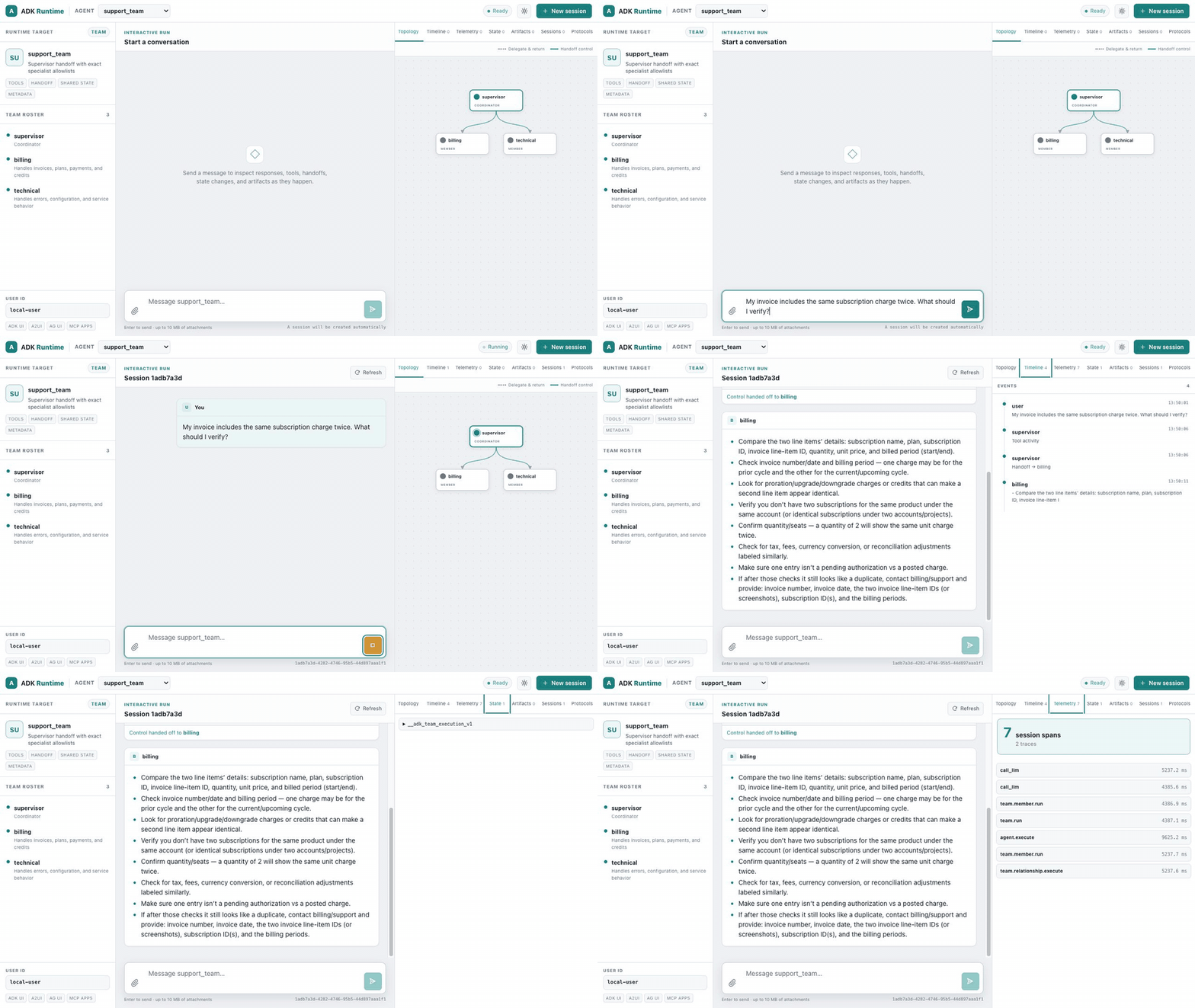
此录制使用便携式团队展示,因此可以清楚地看到动画交接。你构建的 agent 使用相同的运行时 UI, 但拓扑中只有一个节点。
如果想进行冒烟测试,请单独验证 HTTP 运行时:
curl -fsS http://127.0.0.1:8080/api/health现在,你已经拥有一个可执行文件,它能够运行 agent、管理会话、流式传输事件,并提供自己的测试界面。 无需单独安装前端。
更喜欢仅使用终端的 agent?
改用 OpenAI 控制台模板:
cargo adk new quickstart_console --template openai
cd quickstart_console
cp .env.example .env   # replace the OPENAI_API_KEY placeholder
cargo run
零配置替代方案 — adk::run()
如果你只想快速运行一个 agent,而不进行构建,请使用以下单行命令:
use adk_rust::run;

#[tokio::main]
async fn main() -> anyhow::Result<()> {
    dotenvy::dotenv().ok();
    // Minimal default: set GOOGLE_API_KEY. Add provider features for OpenAI/Anthropic.
    let response = run("You are a helpful assistant.", "Explain Rust in one sentence.").await?;
    println!("{response}");
    Ok(())
}
此调用会在一次调用中处理已编译提供商的检测、会话创建、代理构建和执行。非常适合脚本、原型和快速实验。
理解生成的代码
API 脚手架的 src/main.rs 会构建一个普通的 LlmAgent,然后将其挂载到标准服务器中。重要的连接方式如下:
use adk_rust::prelude::*;
use adk_rust::server::{ServerConfig, create_app};
use adk_rust::session::InMemorySessionService;
use std::sync::Arc;

#[tokio::main]
async fn main() -> anyhow::Result<()> {
    dotenvy::dotenv().ok();
    let api_key = std::env::var("OPENAI_API_KEY")?;

    let model = adk_rust::model::openai::OpenAIClient::new(
        adk_rust::model::openai::OpenAIConfig::new(&api_key, "gpt-5.6-terra"),
    )?;

    let agent: Arc<dyn Agent> = Arc::new(
        LlmAgentBuilder::new("quickstart_agent")
            .description("REST API agent")
            .instruction("You are a helpful assistant accessible via REST API.")
            .model(Arc::new(model))
            .build()?,
    );

    let config = ServerConfig::new(
        Arc::new(adk_rust::SingleAgentLoader::new(agent)),
        Arc::new(InMemorySessionService::new()),
    );
    let app = create_app(config);

    let listener = tokio::net::TcpListener::bind("127.0.0.1:8080").await?;
    axum::serve(listener, app).await?;
    Ok(())
}| 部分 | 功能 |
|---|---|
OpenAIClient | 从 OPENAI_API_KEY 创建模型客户端 |
LlmAgentBuilder | 构建器模式:名称、描述、指令(系统提示)、模型、工具 |
InMemorySessionService | 为运行器和 UI 存储本地开发会话 |
create_app | 将 REST/SSE API 和嵌入式运行时 UI 挂载到同一个 Axum 路由器中 |
添加自定义工具
添加工具最快的方式是使用 #[tool] 宏。将 adk-tool 添加到依赖项中:
[dependencies]
adk-tool = "2.1.0"
schemars = "1"
serde = { version = "1", features = ["derive"] }
然后定义一个工具——文档注释会成为描述,参数结构体会成为 JSON schema:
use adk_tool::{tool, AdkError};
use schemars::JsonSchema;
use serde::Deserialize;
use serde_json::{json, Value};

#[derive(Deserialize, JsonSchema)]
struct WeatherArgs {
    /// The city to look up
    city: String,
}

/// Get the current weather for a city.
#[tool]
async fn get_weather(args: WeatherArgs) -> std::result::Result<Value, AdkError> {
    Ok(json!({ "temp": 22, "city": args.city, "condition": "sunny" }))
}
该宏会生成一个实现了 Tool 的 GetWeather 结构体。将它添加到你的 agent 中:
let agent = LlmAgentBuilder::new("weather_agent")
    .instruction("Use the get_weather tool for weather questions.")
    .model(Arc::new(model))
    .tool(Arc::new(GetWeather))  // Generated by #[tool]
    .build()?;
提示: 也可以使用已配置好工具的模板创建项目:
cargo adk new my-agent --template tools
内置工具
ADK 还提供了可直接使用的工具:
// Google Search (handled server-side by Gemini)
.tool(Arc::new(GoogleSearchTool::new()))

// Exit a LoopAgent
.tool(Arc::new(ExitLoopTool::new()))
作为 Web 服务器运行
如果需要 HTTP 服务,请创建服务器项目:
cargo adk new my-api --template api --provider openai
cd my-api
cp .env.example .env
cargo run
打开 http://127.0.0.1:8080/ui/。默认的基础模板使用轻量级控制台启动器。
使用其他模型
通过 feature flags 启用提供商。默认构建仅包含 Gemini,以便快速安装,因此只需添加所需的提供商:
[dependencies]
adk-rust = { version = "2.1.0", features = ["openai"] }也可以使用提供商创建项目:cargo adk new my-agent --provider openai
OpenAI
let api_key = std::env::var("OPENAI_API_KEY")?;
let model = OpenAIClient::new(OpenAIConfig::new(api_key, "gpt-5.6-terra"))?;
Anthropic
let api_key = std::env::var("ANTHROPIC_API_KEY")?;
let model = AnthropicClient::new(AnthropicConfig::new(api_key, "claude-sonnet-5"))?;
DeepSeek
let api_key = std::env::var("DEEPSEEK_API_KEY")?;
let model = DeepSeekClient::chat(api_key)?;         // standard
// let model = DeepSeekClient::reasoner(api_key)?;   // chain-of-thought
Groq
let api_key = std::env::var("GROQ_API_KEY")?;
let model = GroqClient::new(GroqConfig::gpt_oss_120b(api_key))?;
Ollama(本地)
// Requires: ollama serve && ollama pull llama3.2
let model = OllamaModel::new(OllamaConfig::new("llama3.2"))?;
支持的模型
| 提供商 | 模型示例 | 功能标志 |
|---|---|---|
| Gemini | gemini-3.7-flash, gemini-3.6-flash, gemini-3.1-pro-preview | (默认) |
| OpenAI | gpt-5.6-terra, gpt-5.6-sol, gpt-5.6-luna | openai |
| Anthropic | claude-sonnet-5, claude-opus-5, claude-fable-5 | anthropic |
| DeepSeek | deepseek-v4-flash, deepseek-v4-pro | deepseek |
| Groq | openai/gpt-oss-120b, openai/gpt-oss-20b | groq |
| Ollama | qwen3.6:35b-a3b, qwen3.5, llama3.2:3b | ollama |
后续步骤
- LlmAgent 配置 — 所有配置选项
- 函数工具 — 使用
#[tool]创建自定义工具 - 工作流代理 — 顺序、并行、循环管道
- 会话 — 管理对话状态
- 回调 — 自定义代理行为